DeepForest Multi-Agent Part 1: Moving to Open Source Models

I am an AI/ML enthusiast with a strong passion for bridging technology and social impact. I love solving complex problems whether it's solving confusion on any AI/ML concept or building LLM systems for real-world applications.
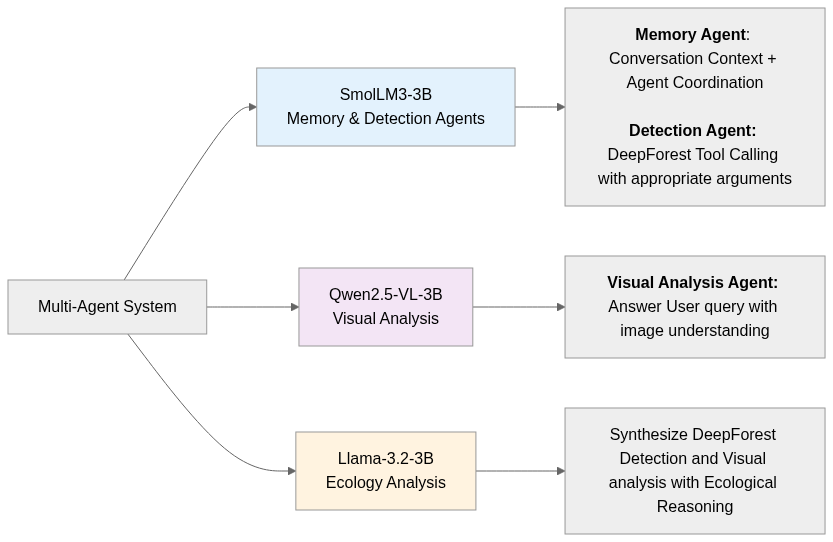
Moving forward, I am shifting from using commercial APIs to open-source models based on mentor feedback. This shift requires implementing a multi-agent architecture because HuggingFace models. I focused on preparing the foundations for that system. I updated configuration management by adding default DeepForest parameters (DEEPFOREST_DEFAULTS), model assignments (AGENT_MODELS), and agent-specific generation configs (AGENT_CONFIGS). For image handling, I extended utilities in image_utils.py to better load, validate, serialize, and analyze images. On the detection side, I updated the DeepForest engine to correctly combine both detection and classification confidence scores. Finally, I implemented model managers for SmolLM3-3B (tool calling and memory), Qwen2.5-VL-3B-Instruct (vision-language analysis), and Llama-3.2-3B-Instruct (ecological reasoning).
Configuration Management Update
In week 1, I already defined the paths for different DeepForest models, and BGR color tuples for bounding box visualization. Now, I am also adding default parameters for the DeepForest prediction in DEEPFOREST_DEFAULTS. I followed the default parameters based on DeepForest documentation. For model orchestration, the AGENT_MODELS dictionary assigns specific models to each functional component: a lightweight memory model (SmolLM3-3B) for context retention, the same model reused for DeepForest detector reasoning, Qwen2.5-VL-3B-Instruct for visual multimodal analysis due to its better handling of image-text queries, and Llama-3.2-3B-Instruct for final ecological synthesizing. Each agent has its own tuning parameters in AGENT_CONFIGS.
Permalink: config.py blob
Image Processing Utilities Update
I updated the src/deepforest_agent/utils/image_utils.py file with few more functions that will be useful for this multi-agent system.
Permalink: image_utils.py blob
load_pil_image_from_path loads an image directly as a PIL object instead of a NumPy array, useful when we need to work with image manipulation from the Gradio image path. It validates the file path and converts non-RGB modes into RGB for consistency.
create_temp_image_file converts a NumPy array into a unique temporary image file for use with external tools, while cleanup_temp_file safely deletes such files to prevent clutter. Meanwhile, validate_image_path acts as a safeguard, ensuring that the given path points to a valid, readable image before further processing, reducing the risk of downstream failures.
get_image_info extracts metadata about an image, such as size, mode, format, and file size. It’s mainly used for logging the image information for debugging and monitoring purporse.
convert_pil_image_to_bytes serializes a PIL image into PNG bytes for low-level storage or transmission, while encode_pil_image_to_base64_url wraps this into a convenient base64 data URL for JSON or API usage. On the reverse side, decode_base64_to_pil_image reconstructs a PIL image from base64 strings or data URLs with error handling, and decode_base64_url_to_np_array extends this to directly return an RGB NumPy array for model-ready inputs.
check_image_resolution_for_deepforest validates if a GeoTIFF image has a fine enough resolution for DeepForest (≤10 cm/pixel). The reason I am setting this condition is because DeepForest Tree detector was trained on 10cm data on 400px crops according to the documentation. It uses rasterio to inspect CRS and pixel sizes, converting units into centimeters when possible. If CRS metadata is missing, geographic, or ambiguous, it returns a fallback with warnings from the call _non_geotiff_result, that generates a standardized warning result when the input image isn’t a valid GeoTIFF. It marks the file as “suitable” (to avoid blocking workflows) but provides a warning suggesting optimal inputs. My mentor later suggested me to create a feature for the images that are not GeoTIFF by asking the user for the metadata.
def check_image_resolution_for_deepforest(image_path: str, max_resolution_cm: float = 10.0) -> Dict[str, Any]:
    try:
        with rasterio.open(image_path) as src:
            if src.crs is None:
                return _non_geotiff_result(image_path, "No coordinate system found")
            if src.crs.is_geographic:
                return _non_geotiff_result(image_path, "Geographic coordinates detected")

            transform = src.transform
            if transform.is_identity:
                return _non_geotiff_result(image_path, "No spatial transformation found")

            pixel_width = abs(transform.a)
            pixel_height = abs(transform.e)
            pixel_size = max(pixel_width, pixel_height)

            crs_units = src.crs.to_dict().get('units', '').lower()

            if crs_units in ['m', 'metre', 'meter']:
                resolution_cm = pixel_size * 100
            elif 'foot' in crs_units or crs_units == 'ft':
                resolution_cm = pixel_size * 30.48
determine_patch_size is a function to tile the images for visual analysis by the vision language model. Because larger raster will take significant memory and may cause Out of Memory error like below.

Tiling the image based on a patch size and analyzing each of this tile will avoid the issue. For now, this function picks a patch size based on file type: 400 for TIF/TIFF images (to preserve resolution and handle geospatial data), and 1000 for all other formats. If the path is missing, it falls back to the default patch size from config.py.
DeepForest Detection Engine
Previously, for alive/dead tree detection, I was adding only the classification confidence score without the detection confidence score for the tree. Hence I updated the logic to add both confidence scores. I just updated some parts of the predict_objects method where “Handle alive/dead tree classification results” started. I also add this logic to _generate_detection_summary and _plot_boxes method.
Permalink: deepforest_tool.py blob
Model Manager Implementation
The multi-agent system requires specialized model managers for different reasoning capabilities. I implemented three distinct model managers following the official HuggingFace documentation for each model.
Here’s the Agent Orchestrator Workflow:
SmolLM3-3B Model Manager for memory and detection agents
SmolLM3-3B model excels at tool calling and maintaining conversational context while being memory-efficient. The official documentation at https://huggingface.co/HuggingFaceTB/SmolLM3-3B showed strong performance on reasoning tasks with XML tool integration, making it ideal for DeepForest tool’s argument suggestion based on User query.
Permalink: smollm3_3b.py Blob
SmolLM3ModelManager class is a dedicated wrapper for managing SmolLM3-3B, handling both text generation and GPU memory cleanup. The motivation is to avoid directly scattering model loading, inference, and memory release code across the project.
The initializer sets up the model manager with a Hugging Face model ID, defaulting to
"HuggingFaceTB/SmolLM3-3B". It also initializes a counter for the number of times the model has been loaded._load_modelprivate helper encapsulates the actual model and tokenizer loading. It uses Hugging Face’sfrom_pretrainedwithdevice_map="auto"to automatically offload weights across GPU(s)/CPU, andlow_cpu_mem_usage=Trueto minimize RAM overhead. The tokenizer is also loaded withtrust_remote_code=Trueto allow custom implementations shipped with the model.generate_responsemethod is the core text generation workflow. It takes a list of chat-style messages and optional tool specifications, formats them using Hugging Face’sapply_chat_template, and then feeds them into the model for inference. The method supports tuning generation withmax_new_tokens,temperature, andtop_p.
Following the SmolLM3 documentation, I implemented proper tool calling with XML template formatting:if tools: text = tokenizer.apply_chat_template( messages, xml_tools=tools, tokenize=False, add_generation_prompt=True ) else: text = tokenizer.apply_chat_template( messages, tokenize=False, add_generation_prompt=True )Then, the input text is tokenized into tensors and moved to the same device as the model. Then, the model generates new tokens based on the input using parameters such as
max_new_tokens(limiting the output length),temperature(controlling randomness), andtop_p(nucleus sampling for diverse yet relevant outputs). Thedo_sample=Trueensures sampling instead of greedy decoding, andpad_token_idhandles padding properly. After generation, the code slices off the part of the output that corresponds to the input (so only the newly generated tokens remain). Finally, the tokens are decoded back into human-readable text, producing the model’s response.model_inputs = tokenizer([text], return_tensors="pt").to(model.device) generated_ids = model.generate( model_inputs.input_ids, max_new_tokens=max_new_tokens, temperature=temperature, top_p=top_p, do_sample=True, pad_token_id=tokenizer.eos_token_id ) generated_ids = [ output_ids[len(input_ids):] for input_ids, output_ids in zip(model_inputs.input_ids, generated_ids) ] response = tokenizer.batch_decode(generated_ids, skip_special_tokens=True)[0]The function also manages GPU memory aggressively: once inference completes, the model, tokenizer, and intermediate tensors are deleted, garbage collection is run multiple times, and CUDA caches are cleared. Rather than maintaining persistent model instances, I chose a load-and-release pattern based on GPU memory constraints. With three 3B parameter models, keeping all loaded simultaneously would exceed typical GPU memory limits (24GB+ required).
Qwen2.5-VL-3B Manager Implementation
Qwen2.5-VL-3B-Instruct vision-language model provides the critical capability to analyze images according to User query. The documentation at https://huggingface.co/Qwen/Qwen2.5-VL-3B-Instruct demonstrated superior performance on visual reasoning tasks compared to other 3B parameter alternatives.
Permalink: qwen_vl_3b_instruct.py blob
QwenVL3BModelManager class is a wrapper around Qwen2.5-VL-3B specifically for multimodal (vision-language) analysis. This class centralizes model loading, response generation, and GPU cleanup. It also tracks how many times the model has been loaded (load_count).
The initializer sets the model ID, defaulting to
"Qwen/Qwen2.5-VL-3B-Instruct", and initializesload_countat zero. This provides flexibility in swapping models without touching the rest of the pipeline._load_modelprivate method loads both the vision-language model (Qwen2_5_VLForConditionalGeneration) and its paired processor (AutoProcessor). The model is loaded with automatic device placement (device_map="auto") and automatic dtype selection to optimize for GPU memory. The processor is set up withuse_fast=Truefor tokenization efficiency.generate_responsetakes chat-style messages containing both text and images, formats them using the processor’sapply_chat_template, and extracts structured image/video inputs viaprocess_vision_info. These inputs are then packaged by the processor into tensors suitable for the model. Following the Qwen VL documentation, I used the officialqwen_vl_utilsfor proper image handling:from qwen_vl_utils import process_vision_info # Process vision info using qwen_vl_utils text = processor.apply_chat_template( messages, tokenize=False, add_generation_prompt=True ) # Use process_vision_info for proper image handling image_inputs, video_inputs = process_vision_info(messages) inputs = processor( text=[text], images=image_inputs, videos=video_inputs, padding=True, return_tensors="pt", ) inputs = inputs.to(model.device)The model generates responses with controllable parameters like
max_new_tokensandtemperature(withdo_sampleonly enabled if temperature > 0). After generation, the method trims off the original prompt tokens from the outputs and decodes the final response back into text.generated_ids = model.generate( **inputs, max_new_tokens=max_new_tokens, temperature=temperature, do_sample=True if temperature > 0 else False ) generated_ids_trimmed = [ out_ids[len(in_ids):] for in_ids, out_ids in zip(inputs.input_ids, generated_ids) ] response = processor.batch_decode( generated_ids_trimmed, skip_special_tokens=True, clean_up_tokenization_spaces=False )[0]After each inference, the model, processor, inputs, and outputs are explicitly deleted, garbage collection is run multiple times, and CUDA caches are cleared.
Llama-3.2-3B-Instruct for ecology analysis
Llama-3.2-3B-Instruct model brings domain-agnostic reasoning capabilities that can be specialized for ecological interpretation. The documentation at https://huggingface.co/meta-llama/Llama-3.2-3B-Instruct showed strong performance on analytical reasoning tasks.
Permalink: llama32_3b_instruct.py blob
Llama32ModelManager is a wrapper around Meta's Llama-3.2-3B-Instruct model that is optimized for multilingual dialogue use cases, including agentic retrieval and summarization tasks. This class centralizes model loading, response streaming, and GPU cleanup. It also tracks how many times the model has been loaded (load_count).
The
__init__method of theLlama32ModelManagerclass initializes an instance that takes an optionalmodel_idargument, which defaults to"meta-llama/Llama-3.2-3B-Instruct". This allows the manager to know which model to load from Hugging Face. Additionally, it initializes aload_countattribute to zero,The
_load_modelprivate method handles loading the model and tokenizer from Hugging Face. It usesAutoTokenizer.from_pretrainedandAutoModelForCausalLM.from_pretrainedwith appropriate configurations, includingtrust_remote_code=True,torch_dtype="auto",device_map="auto", andlow_cpu_mem_usage=Trueto optimize memory usage.The
generate_response_streamingfunction is the core method for generating text responses in a streaming fashion, i.e., token by token. It accepts a list of messages (with roles and content) and parameters controlling token generation, such asmax_new_tokens,temperature, andtop_p. The function first prints a message indicating the model loading attempt and calls the private_load_modelmethod. After preparing the input using the tokenizer’s chat template, it sets up aTextIteratorStreamerto stream generated tokens in real time. A separate thread runs the model’sgeneratemethod with streaming enabled, and the method yields each generated token as it appears. When generation finishes, it yields a final dictionary marking completion.text = tokenizer.apply_chat_template( messages, tokenize=False, add_generation_prompt=True ) model_inputs = tokenizer([text], return_tensors="pt").to(model.device) streamer = TextIteratorStreamer( tokenizer, timeout=60.0, skip_prompt=True, skip_special_tokens=True ) generation_kwargs = { "input_ids": model_inputs.input_ids, "max_new_tokens": max_new_tokens, "temperature": temperature, "top_p": top_p, "do_sample": True, "pad_token_id": tokenizer.eos_token_id, "streamer": streamer } thread = Thread(target=model.generate, kwargs=generation_kwargs) thread.start() for new_text in streamer: yield {"token": new_text, "is_complete": False} thread.join() yield {"token": "", "is_complete": True}Additionally, it empties the GPU cache, collects inter-process memory, synchronizes CUDA, and attempts to reset memory tracking.
This first stage was about laying the groundwork: defining defaults, setting up structured configs, building out utilities, and implementing model managers. Without these, the multi-agent system would be brittle and impossible to scale. The next step will be connecting these managers into a real orchestration flow. Specifically:
Add a session-based state manager (thread ID) for tracking conversation history, agent outputs, and image context.
Implement a cache utility for tool results keyed by arguments to avoid redundant calls.
Build a tool handler that extracts tool calls from model responses and executes them with the DeepForest tool.
Define a structured response schema and parsing utilities, so different agents can hand results to each other cleanly.


