DeepForest Multi-Agent Part 4: Agent Implementation and System Orchestration

I am an AI/ML enthusiast with a strong passion for bridging technology and social impact. I love solving complex problems whether it's solving confusion on any AI/ML concept or building LLM systems for real-world applications.
Moving forward, I will lay out the workflow of our DeepForest Multi-Agent system. According to the workflow the orchestrator along with all the agent is implemented. The Gradio interface supports uploading image and shows a chatbot. Underneath it the gallery of all annotated image is displayed. Then detection monitor always shows current tool call results.
Comprehensive Logging System
The logging system provides complete observability into the multi-agent workflow, enabling debugging, performance monitoring, and system analysis. I implemented a conversation-style logging approach that captures the natural flow of agent interactions.
Permalink: logging_utils.py blob
Thread-Safe Logging Architecture
The logging system handles concurrent sessions and agent executions through thread-safe operations:
class MultiAgentLogger:
    def __init__(self, logs_dir: str = "logs"):
        self.logs_dir = Path(logs_dir)
        self.logs_dir.mkdir(exist_ok=True)
        self._lock = threading.Lock()
Design Decision: Each session receives its own log file with timestamp-based naming (session_{session_id}_{date}.log). This approach prevents log conflicts while enabling easy session tracking and analysis.
Writing Log Entries (_write_log_entry)
At the heart of the logger lies the _write_log_entry method. This function appends structured log messages to the session’s log file. Every entry is timestamped for traceability, and the format changes depending on the event type: session start, lifecycle event, or agent response. Wrapping the write operation inside a lock ensures thread safety.
Session Event Logging (log_session_event)
Sessions aren’t just conversations; they have lifecycles, creation, image uploads, clearing, and workflow initiation. The log_session_event method records these milestones in human-readable form. For example, when an image is uploaded, it logs details like size and mode.
Agent Execution Logging (log_agent_execution)
When multiple agents (e.g., memory, detector, visual, ecology) are working together, logging each one’s execution is non-negotiable. This method captures the input, output, execution time, and optional metadata for every agent run. The agent names are formatted into readable labels (e.g., detector → DeepForest Detector Agent) for clarity.
def log_agent_execution(self, session_id: str, agent_name: str, agent_input: str,
                       agent_output: str, execution_time: float, additional_data: Optional[Dict[str, Any]] = None):
    formatted_name_with_time = f"{agent_name} ({execution_time:.2f}s)"
    content = agent_output
    self._write_log_entry(session_id, formatted_name_with_time, content)
Tool Call Logging (log_tool_call)
DeepForest tools may be called multiple times per session, and this method captures their execution details. It logs whether the call was a cache hit (fast) or a cache miss (expensive), the execution time, and summaries of the detection results.
def log_tool_call(self, session_id: str, tool_name: str, tool_arguments: Dict[str, Any],
                 tool_result: Dict[str, Any], execution_time: float, cache_hit: bool, reasoning: Optional[str] = None):
    status = "Cache Hit (0.00s)" if cache_hit else f"Cache Miss - Executed DeepForest detection ({execution_time:.2f}s)"
    content = f"{status}\nDetection Summary: {tool_result.get('detection_summary', 'No summary')}"
Resolution Check Logging (log_resolution_check)
DeepForest detection heavily depends on input image quality and resolution. This method logs whether an image meets resolution requirements, how long the check took, and details like pixel resolution, image type (GeoTIFF vs. regular), and warnings.
def log_resolution_check(self, session_id: str, image_file_path: str, resolution_result: Dict[str, Any], execution_time: float):
    is_suitable = resolution_result.get("is_suitable", True)
    content = f"Image Resolution Check ({execution_time:.3f}s)\n"
    content += f"Result: {'Suitable' if is_suitable else 'Insufficient'} for DeepForest\n"
    if not is_suitable:
        content += "Impact: DeepForest detection will be skipped due to insufficient resolution"
Sometimes, DeepForest analysis must be skipped due to insufficient resolution or poor image quality. log_deepforest_skip method logs those decisions with detailed reasoning.
Comprehensive JSON Logging (log_comprehensive_json)
Before sending structured data to the ecology agent, the logger captures the entire JSON payload in a readable, indented format.
Tile Analysis Logging (log_tile_analysis)
Large images are split into smaller tiles for processing. This method logs results per tile, including coordinates, detected objects, visual analysis summaries, and assigned DeepForest detections.
The MultiAgentLogger also includes essential maintenance and retrieval functions to streamline session management. The get_session_log_summary method allows quick access to a session’s log file, returning its contents along with metadata such as the file path. To manage multiple sessions efficiently, get_all_session_logs scans the logs directory to fetch all active session IDs, enabling easy dashboard creation, batch analysis, or cleanup operations without storing redundant metadata in memory. Finally, cleanup_old_logs prevents disk space overuse by deleting log files older than a configurable number of days (default is 7).
Multi-Agent Workflow Architecture
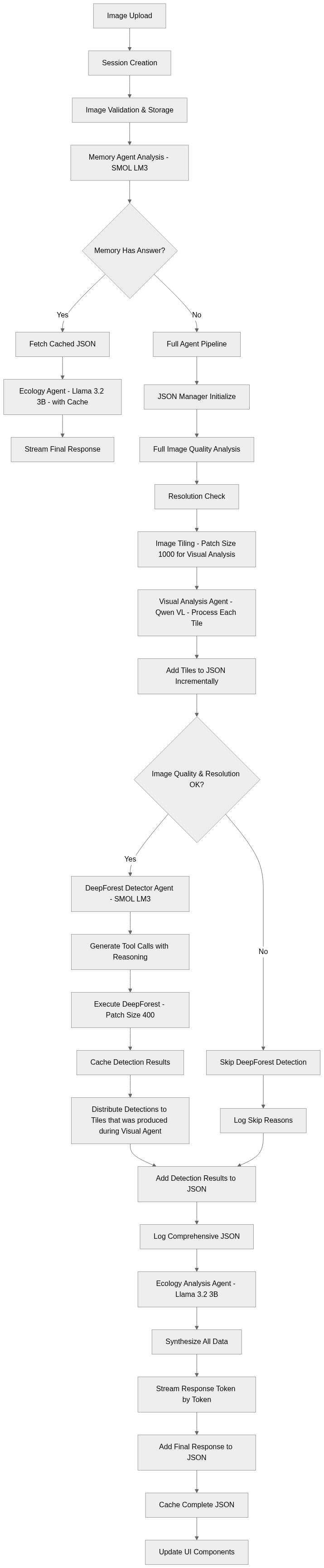
This workflow is basically a pipeline for processing ecological image uploads and turning them into structured analysis. An uploaded image starts a session, gets validated, and is stored. If the memory agent already has a cached JSON with an answer, the system goes straight to the ecology agent, saving compute. Otherwise, the JSON Manager initializes a new structure, and the image goes through quality checks, resolution validation, and tiling for localized analysis. Each tile is processed visually (Qwen VL) and added to the JSON. If the quality is acceptable, DeepForest runs object detection with reasoning-driven tool calls. If not, the pipeline logs the skip reason but still continues. Detected objects are distributed across tiles and appended to the JSON, which then feeds into the ecology agent to generate a holistic explanation. Finally, all outputs are synthesized, streamed live to the user, and cached in a complete JSON for reuse. In short, the workflow ensures efficient reuse (via caching), modular analysis (tile-based + multi-agent), and explainability (logging and JSON tracking).
Memory Agent
The memory agent serves as the system's conversation coordinator, analyzing previous interactions to determine optimal processing paths. Using SmolLM3-3B's reasoning capabilities, it performs sophisticated context matching and data retrieval.
Permalink: memory_agent.py` blob
Initialization (__init__)
The MemoryAgent is initialized with its specific configuration and a model manager for generating responses. It loads agent-specific parameters from a centralized Config and sets up the SmolLM3ModelManager to handle LLM inference.
Conversation History Filtering (_filter_conversation_history)
The _filter_conversation_history method extracts only the user and assistant messages from the full conversation history, discarding system messages or other metadata. It also normalizes message content to a plain string, combining text from structured lists when necessary.
JSON History Context (_get_json_history_context)
This function retrieves and formats the session’s JSON cache alongside the conversation history. For each user message, it appends the corresponding JSON data (if available) and the assistant’s response, producing a structured, readable sequence. This allows the memory agent to have a contextual understanding that integrates both past interactions and structured state information, enabling more precise and informed responses in ongoing conversations.
Structured Conversation Processing (process_conversation_history_structured)
The core method, process_conversation_history_structured, combines filtered conversation history and JSON context to generate a structured analysis of the current user query. It constructs a memory prompt from the prompt_templates.py, calls the model manager to generate a response, measures execution time, and logs the output through the multi-agent logger.
Visual Analysis Agent Implementation
The visual analysis agent leverages Qwen2.5-VL-3B's multimodal capabilities for comprehensive image assessment and tile-by-tile spatial analysis. The agent operates in two distinct modes depending on image characteristics and processing requirements.
Permalink: visual_analysis_agent.py blob
Initialization (__init__)
The VisualAnalysisAgent is initialized with its configuration and a model manager for multimodal image understanding. It loads parameters from Config.AGENT_CONFIGS and sets up the QwenVL3BModelManager to handle visual reasoning tasks.
Full Image Quality Analysis (analyze_full_image_for_quality)
The analyze_full_image_for_quality method evaluates an entire image for suitability in DeepForest processing. It retrieves the current image from the session state and uses a model prompt to generate a multimodal assessment. The output includes the image quality, detected DeepForest objects, and a textual visual analysis. In case of out-of-memory (OOM) issues with large images, it falls back to resolution-based heuristics to provide a basic quality check.
def analyze_full_image_for_quality(self, user_message: str, session_id: str) -> Dict[str, Any]:
    try:
        response = self.model_manager.generate_response(messages=messages, max_new_tokens=self.agent_config["max_new_tokens"], temperature=self.agent_config["temperature"])

        image_quality = parse_image_quality_for_deepforest(response)
        deepforest_objects = parse_deepforest_objects_present(response)
        return {"image_quality_for_deepforest": image_quality, "deepforest_objects_present": deepforest_objects, "status": "success", "oom_fallback": False}

    except Exception as e:
        resolution_result = session_state_manager.get(session_id, "resolution_result")
        if resolution_result and resolution_result.get("is_suitable"):
            fallback_quality = "Yes"
            fallback_objects = ["tree", "bird", "livestock"]
        else:
            fallback_quality = "No"
            fallback_objects = []
        return {"image_quality_for_deepforest": fallback_quality, "status": "oom_fallback", "oom_fallback": True}
Tile-by-Tile Image Analysis (analyze_individual_tiles)
The analyze_individual_tiles method breaks a large image into smaller overlapping tiles and analyzes each tile sequentially to reduce memory load. For every tile, it encodes the image, constructs a prompt, generates a model response, and parses results including visual analysis and additional objects detected. It also logs execution per tile.
def analyze_individual_tiles(self, user_message: str, session_id: str, tool_arguments: Dict[str, Any]) -> List[Dict[str, Any]]:
    patch_size = 1000  # Optimized for visual analysis performance

    for i, (tile, metadata) in enumerate(zip(tiles, tile_metadata)):
        tile_start_time = time.perf_counter()
        print(f"Session {session_id} - Analyzing tile {i+1}/{len(tiles)}")

        tile_base64_url = encode_pil_image_to_base64_url(tile)

        messages = [
            {"role": "system", "content": [{"type": "text", "text": system_prompt}]},
            {
                "role": "user",
                "content": [
                    {"type": "image", "image": tile_base64_url},
                    {"type": "text", "text": user_message}
                ]
            }
        ]

        response = self.model_manager.generate_response(
            messages=messages,
            max_new_tokens=self.agent_config["max_new_tokens"],
            temperature=self.agent_config["temperature"]
        )
Issue Encountered: Processing large numbers of tiles caused cumulative memory buildup leading to out-of-memory errors on subsequent tiles.
Solution: I implemented cleanup after each tile analysis, explicitly deleting large objects and calling garbage collection with GPU cache clearing. This maintains consistent memory usage across the entire tiling process.
The visual agent produces structured outputs that integrate seamlessly with the JSON manager:
additional_objects = parse_additional_objects_json(response)
visual_analysis = parse_visual_analysis(response)

tile_result = {
    "tile_id": i,
    "coordinates": metadata.get("window_coords", {}),
    "metadata": {"patch_size": tiling_params["patch_size"], "overlap": tiling_params["patch_overlap"]},
    "visual_analysis": visual_analysis,
    "additional_objects": additional_objects,
    "assigned_detections": []
}
DeepForest Detector Agent Implementation
The detector agent implements intelligent tool calling using SmolLM3-3B's reasoning capabilities. It bridges user queries, visual analysis results, and memory context into optimized DeepForest parameter selection.
Permalink: deepforest_detector_agent.py blob
Initialization (__init__)
The DeepForestDetectorAgent is initialized with its configuration and a model manager for executing tool-based object detection. It uses the SmolLM3ModelManager to handle reasoning-aware tool calls and loads agent-specific parameters from Config.AGENT_CONFIGS.
Detection Execution with Context (execute_detection_with_context)
The execute_detection_with_context method orchestrates the full detection workflow. It first validates the session and constructs a system prompt combining the user query, memory context, and visual objects detected by the visual agent.
def execute_detection_with_context(self, user_message: str, session_id: str, visual_objects_detected: List[str], memory_context: str) -> Dict[str, Any]:
    system_prompt = create_detector_system_prompt_with_reasoning(user_message, memory_context, visual_objects_detected)
    messages = [
        {"role": "system", "content": system_prompt},
        {"role": "user", "content": user_message}
    ]

    deepforest_tool_schema = get_deepforest_tool_schema()
    response = self.model_manager.generate_response(messages=messages, tools=[deepforest_tool_schema])

    parsed_response = self._parse_response_with_reasoning(response)
    reasoning = parsed_response["reasoning"]
    tool_calls = parsed_response["tool_calls"]
The model generates a response that may include multiple tool calls, each of which is either retrieved from cache or executed live via handle_tool_call. Results, including detection summaries, detected objects, tool reasoning, and execution times, are logged at multiple levels.
for i, tool_call in enumerate(tool_calls):
    tool_name = tool_call["name"]
    tool_arguments = tool_call["arguments"]

    cached_result = tool_call_cache.get_cached_result(tool_name, tool_arguments)

    if cached_result:
        # Use cached results with proper session state updates
        if cached_result.get("annotated_image"):
            session_state_manager.set(session_id, "annotated_image", cached_result["annotated_image"])

        cache_key = cached_result["cache_info"]["cache_key"]
        session_state_manager.add_tool_call_to_history(session_id, tool_name, tool_arguments, cache_key)
    else:
        # Execute tool and cache results
        execution_result = handle_tool_call(tool_name, tool_arguments, session_id)
        cache_key = tool_call_cache.store_result(tool_name, tool_arguments, cache_result)
Response Parsing (_parse_response_with_reasoning)
The _parse_response_with_reasoning method processes the raw model output to extract reasoning and structured tool call information. It returns either a structured dictionary containing reasoning and tool call details or an error dictionary if parsing fails.
Ecology Analysis Agent Implementation
The ecology analysis agent performs the final synthesis using Llama-3.2-3B's advanced reasoning capabilities. It processes comprehensive JSON data structures to generate evidence-based ecological insights with streaming output.
Permalink: ecology_analysis_agent.py blob
Initialization (__init__)
The EcologyAnalysisAgent is initialized with its specific configuration and a model manager, in this case Llama32ModelManager, to handle detailed reasoning and structured response generation. By loading agent-specific parameters from Config.AGENT_CONFIGS, the agent is prepared to interpret ecological queries, combine diverse data inputs, and generate structured insights.
Streaming Synthesis of Analysis (synthesize_analysis_streaming)
The synthesize_analysis_streaming method orchestrates the generation of comprehensive ecological insights in a token-by-token streaming fashion. It first checks for a valid session and returns a clean error if the session does not exist. Then, it constructs a synthesis prompt using the user’s query, memory context, cached JSON from previous steps, and any current JSON data. The prompt guides the model to produce coherent, structured analysis. The method streams the model’s output incrementally, yielding tokens as they are generated, and marks completion when the analysis is fully produced.
Orchestrator Implementation
The orchestrator serves as the central coordination system that manages the multi-agent workflow, resource allocation, and error recovery mechanisms. I designed it to handle the complex branching logic between memory-based shortcuts and full analysis pipelines while maintaining comprehensive monitoring and cleanup capabilities.
Permalink: orchestrator.py blob
Agent Initialization and Statistics Tracking
I maintain separate agent instances rather than creating them per request because each agent has its own model manager that needs to be loaded and cleaned up systematically. The statistics tracking enables performance analysis and optimization over time. The orchestrator initializes all four specialized agents and maintains execution statistics for performance monitoring:
class AgentOrchestrator:
    def __init__(self):
        self.memory_agent = MemoryAgent()
        self.detector_agent = DeepForestDetectorAgent()
        self.visual_agent = VisualAnalysisAgent()
        self.ecology_agent = EcologyAnalysisAgent()

        self.execution_stats = {
            "total_runs": 0,
            "successful_runs": 0,
            "average_execution_time": 0.0,
            "memory_direct_answers": 0,
            "deepforest_skipped": 0
        }
GPU Memory Management Strategy
Sequential execution of multiple 3B parameter models caused cumulative memory buildup exceeding GPU capacity (8-12GB consumer cards). Since multiple 3B parameter models require careful memory management, I implemented comprehensive GPU monitoring and cleanup:
def _log_gpu_memory(self, session_id: str, stage: str, agent_name: str):
    if torch.cuda.is_available():
        allocated_gb = torch.cuda.memory_allocated() / 1024**3
        cached_gb = torch.cuda.memory_reserved() / 1024**3

        multi_agent_logger.log_agent_execution(
            session_id=session_id,
            agent_name=f"gpu_memory_{stage}",
            agent_input=f"{agent_name} - {stage}",
            agent_output=f"GPU Memory - Allocated: {allocated_gb:.2f} GB, Cached: {cached_gb:.2f} GB",
            execution_time=0.0
        )

def _aggressive_gpu_cleanup(self, session_id: str, stage: str):
    if torch.cuda.is_available():
        for i in range(3):
            gc.collect()
            torch.cuda.empty_cache()

        torch.cuda.ipc_collect()
        torch.cuda.synchronize()

        try:
            torch.cuda.reset_peak_memory_stats()
            torch.cuda.reset_accumulated_memory_stats()
        except:
            pass

        allocated = torch.cuda.memory_allocated() / 1024**3
        cached = torch.cuda.memory_reserved() / 1024**3

        if cached > 1.0:
            print(f"WARNING: {cached:.2f} GB still cached after cleanup")
Detection Data Formatting for UI Integration
The detection monitor needs to display data regardless of which workflow path was taken. In the memory path, detection data comes from cache references. In the full pipeline path, it comes from fresh detection results. The visual agent provides additional objects that aren't detected by DeepForest but are relevant to user queries. This function unifies these three data sources into consistent JSON display format.
def _format_detection_data_for_monitor(self, detection_result: Optional[Dict[str, Any]],
                                      visual_additional_objects: List[Dict[str, Any]],
                                      tool_calls_referenced: Optional[List[Dict[str, Any]]] = None) -> str:
    monitor_parts = []
    detections_list = []

    if detection_result and detection_result.get("status") == "success":
        detections_list = detection_result.get("detections_list", [])
    elif tool_calls_referenced:
        cached_data = self._fetch_cached_detection_data(tool_calls_referenced)
        if cached_data and cached_data.get("detections_list"):
            detections_list = cached_data["detections_list"]

    if detections_list:
        monitor_parts.append(json.dumps(detections_list, indent=2))

    if visual_additional_objects:
        monitor_parts.append(json.dumps(visual_additional_objects, indent=2))

    return "\n".join(monitor_parts) if monitor_parts else "No detection data available"
The function first attempts to use direct detection results from the current workflow. If those aren't available (memory path), it falls back to reconstructing data from tool call references. Visual additional objects are always included when available to provide complete object information to users.
Cache Data Reconstruction for Memory Path
The memory agent provides JSON structures that contain cache references but not the actual detection data. The UI monitor needs to display the actual bounding boxes, confidence scores, and object labels. This function bridges that gap by using cache references to fetch the original detection data that was stored during previous processing. The function extracts tool call metadata from JSON tiles, validates that cache keys and arguments are present, then uses the cache system to retrieve the original detection results. Multiple tool calls are combined into unified detection lists and summaries that match the format expected by the UI components.
def _fetch_cached_detection_data(self, tool_calls_referenced: List[Dict[str, Any]]) -> Optional[Dict[str, Any]]:
    combined_results = []
    combined_detection_summary = []
    combined_detections_list = []
    total_detections = 0

    for tool_call in tool_calls_referenced:
        if tool_call.get("tool_name") == "run_deepforest_object_detection":
            cache_key = tool_call.get("cache_key")
            tool_arguments = tool_call.get("arguments", {})

            if cache_key and tool_arguments:
                try:
                    cached_result = tool_call_cache.get_cached_result(
                        "run_deepforest_object_detection",
                        tool_arguments
                    )
                    if cached_result:
                        combined_detection_summary.append(cached_result.get("detection_summary", ""))
                        combined_detections_list.extend(cached_result.get("detections_list", []))
                        total_detections += len(cached_result.get("detections_list", []))
                except Exception as e:
                    print(f"Error fetching cached data: {e}")

    return {
        "detection_summary": " | ".join(combined_detection_summary),
        "detections_list": combined_detections_list,
        "total_detections": total_detections,
        "status": "success",
        "tool_results": combined_results,
        "cache_source": "memory_referenced"
    }
Main Workflow Orchestration Logic
The orchestrator validates session state and sets processing flags to prevent concurrent operations. The session manager's thread-safe operations ensure that multiple potential requests for the same session are handled correctly.
def process_user_message_streaming(self, user_message: str, conversation_history: List[Dict[str, Any]], session_id: str):
    start_time = time.perf_counter()
    self.execution_stats["total_runs"] += 1

    agent_results = {}
    execution_summary = {
        "agents_executed": [],
        "execution_order": [],
        "timings": {},
        "status": "in_progress",
        "session_id": session_id,
        "workflow_type": "restructured",
        "memory_provided_direct_answer": False,
        "deepforest_executed": False
    }
Follow-up questions and query variations often can be answered using previous analysis results. By checking memory first, the system avoids expensive visual analysis and detection processing when cached data is sufficient. The memory agent provides 1-based human-readable cache references (JSON 1, JSON 2), which must be converted to 0-based array indices for actual data retrieval. The validation ensures the referenced cache index exists before attempting to use it for synthesis.
memory_result = self.memory_agent.process_conversation_history_structured(
    conversation_history=conversation_history,
    latest_message=user_message,
    session_id=session_id
)

if memory_result["answer_present"]:
    self.execution_stats["memory_direct_answers"] += 1
    execution_summary["memory_provided_direct_answer"] = True

    cached_json = None
    json_cache_index = memory_result.get("json_cache")
    if json_cache_index is not None:
        json_cache = session_state_manager.get_json_cache(session_id)
        if json_cache_index < len(json_cache):
            cached_json = json_cache[json_cache_index]
Full Agent Pipeline Execution
When memory doesn't contain relevant data, the orchestrator executes the complete multi-agent workflow with incremental JSON building. The decision combines results from both visual quality assessment (subjective analysis by vision model) and resolution validation (objective geometric analysis). Both conditions must be satisfied for detection to proceed, ensuring optimal resource utilization.
Gradio Interface Implementation - User Interaction Coordination
Permalink: app.py blob
Session-Based Image Upload and Validation Pipeline
The image upload function establishes the foundation for all subsequent processing by creating isolated user sessions.
def upload_image(image_path):
    if image_path is None:
        return (
            gr.Chatbot(visible=False), None, "No image uploaded",
            gr.Textbox(visible=False), gr.Button(visible=False), gr.Button(visible=False),
            gr.Gallery(visible=False), "No image uploaded", None
        )

    if not validate_image_path(image_path):
        return (
            gr.Chatbot(visible=False), None, "Invalid image file or path not accessible",
            gr.Textbox(visible=False), gr.Button(visible=False), gr.Button(visible=False),
            gr.Gallery(visible=False), "Invalid image file for analysis.", None
        )
The function returns a nine-element tuple that updates all relevant UI components simultaneously. The core upload processing implements comprehensive error handling:
try:
    pil_image = load_pil_image_from_path(image_path)
    if pil_image is None:
        raise Exception("Failed to load image")
    image_info = get_image_info(image_path)
except Exception as e:
    return (
        gr.Chatbot(visible=False), None, f"Error loading image: {str(e)}",
        gr.Textbox(visible=False), gr.Button(visible=False), gr.Button(visible=False),
        gr.Gallery(visible=False), "Error loading image for analysis.", None
    )

session_id = session_state_manager.create_session(pil_image)
session_state_manager.set(session_id, "image_file_path", image_path)
The session stores both the PIL image object (for in-memory processing) and the file path (for raster operations and resolution checking). This dual storage approach enables different processing strategies depending on image characteristics and agent requirements.
Streaming Message Processing Architecture
The message processing function coordinates real-time interaction between users and the multi-agent system.
def process_message_streaming(user_message, chatbot_history, generated_images, detection_monitor, session_id):
    if not user_message.strip():
        yield chatbot_history, "", generated_images, detection_monitor, gr.Button(interactive=True), gr.Textbox(interactive=True)
        return

    if session_id is None or not session_state_manager.session_exists(session_id):
        error_msg = "Session expired or invalid. Please upload an image to start a new session."
        chatbot_history.append({"role": "user", "content": user_message})
        chatbot_history.append({"role": "assistant", "content": error_msg})
        yield chatbot_history, "", generated_images, detection_monitor, gr.Button(interactive=True), gr.Textbox(interactive=True)
        return

    current_image = session_state_manager.get(session_id, "current_image")
    if current_image is None:
        error_msg = "No image found in your session. Please upload an image first."
        chatbot_history.append({"role": "user", "content": user_message})
        chatbot_history.append({"role": "assistant", "content": error_msg})
        yield chatbot_history, "", generated_images, detection_monitor, gr.Button(interactive=True), gr.Textbox(interactive=True)
        return
The function provides immediate feedback for invalid states by updating the chat history with clear error messages and ensuring UI controls remain interactive.
Multimodal Message Construction
Vision-language models need image context for visual analysis, but including the image in every message would increase processing overhead and message size unnecessarily. The first message establishes visual context, while subsequent messages reference this context through session state. The interface handles the complexity of multimodal message formatting for vision-language models.
if session_state_manager.get(session_id, "first_message", True):
    image_base64_url = encode_pil_image_to_base64_url(current_image)
    user_msg = {
        "role": "user",
        "content": [
            {"type": "image", "image": image_base64_url},
            {"type": "text", "text": user_message}
        ]
    }
    session_state_manager.set(session_id, "first_message", False)
else:
    user_msg = {
        "role": "user",
        "content": [
            {"type": "text", "text": user_message}
        ]
    }

session_state_manager.add_to_conversation(session_id, user_msg)
The message construction creates properly formatted multimodal content arrays that match the expected input format for vision-language models. Text-only messages use simplified content arrays that reduce processing overhead for pure conversation interactions.
Real-Time Streaming Coordination
The streaming integration coordinates real-time updates from the orchestrator with UI component synchronization.
for result in orchestrator.process_user_message_streaming(
    user_message=user_message,
    conversation_history=conversation_history,
    session_id=session_id
):
    if result["type"] == "progress":
        chatbot_history[-1] = {"role": "assistant", "content": result["message"]}
        yield chatbot_history, "", generated_images, detection_monitor, gr.Button(interactive=False), gr.Textbox(interactive=False)

    elif result["type"] == "streaming":
        chatbot_history[-1] = {"role": "assistant", "content": result["message"]}
        yield chatbot_history, "", generated_images, detection_monitor, gr.Button(interactive=False), gr.Textbox(interactive=False)

    elif result["type"] == "final":
        final_response = result["message"]
        chatbot_history[-1] = {"role": "assistant", "content": final_response}
        updated_detection_monitor = result.get("detection_data", "")

        annotated_image = session_state_manager.get(session_id, "annotated_image")
        if annotated_image:
            generated_images.append(annotated_image)

        yield chatbot_history, "", generated_images, updated_detection_monitor, gr.Button(interactive=True), gr.Textbox(interactive=True)
The yield statements update all six UI components simultaneously to maintain consistency. During processing, input controls are disabled to prevent conflicting requests. The final update re-enables controls and updates detection monitors with complete data.
Interface Layout and Component Organization
The interface creates a sophisticated multi-component layout that supports complex multi-agent workflows.
def create_interface():
    with gr.Blocks(
        title="DeepForest Multi-Agent System",
        theme=gr.themes.Default(
            spacing_size=gr.themes.sizes.spacing_sm,
            radius_size=gr.themes.sizes.radius_none,
            primary_hue=gr.themes.colors.emerald,
            secondary_hue=gr.themes.colors.lime
        )
    ) as app:

        uploaded_image_state = gr.State(None)
        generated_images_state = gr.State([])
        session_id_state = gr.State(None)

        with gr.Row():
            with gr.Column(scale=1):
                image_upload = gr.Image(type="filepath", label="Upload Ecological Image", height=300)
                upload_status = gr.Textbox(label="Upload Status", value="Upload an image to begin analysis", interactive=False)

            with gr.Column(scale=2):
                chatbot = gr.Chatbot(label="Multi-Agent Ecological Analysis", height=400, visible=False, show_copy_button=True, type='messages')

                with gr.Row():
                    msg_input = gr.Textbox(placeholder="Ask about wildlife, forest health, ecological patterns...", scale=4, visible=False)
                    send_btn = gr.Button("Analyze", scale=1, visible=False, variant="primary")
                    clear_btn = gr.Button("Clear", scale=1, visible=False)

        generated_images_display = gr.Gallery(label="Annotated Images after DeepForest Detection", columns=2, height=400, visible=False)

        detection_data_monitor = gr.Textbox(label="Detection Data Monitor", value="Upload an image and ask a question to see detection data", interactive=False, show_copy_button=True)
The two-column layout separates image upload (left) from conversation interface (right), creating logical workflow progression. The gallery and detection monitor below the main interaction area provide comprehensive result visualization without cluttering the primary interaction space. The three state variables persist critical data across function calls. uploaded_image_state maintains the PIL image object, generated_images_state accumulates annotated results across the session, and session_id_state links UI interactions to backend session management.
Event Handler Coordination and Chaining
Gradio requires explicit sequencing of operations that depend on each other. The image upload must complete before example questions become visible. The message processing must complete before the image gallery updates with new annotated images. The .then() chaining ensures proper operation ordering.
# Image upload triggers session creation and UI state updates
image_upload.change(
    fn=upload_image,
    inputs=[image_upload],
    outputs=[chatbot, uploaded_image_state, upload_status, msg_input, send_btn, clear_btn, generated_images_display, detection_data_monitor, session_id_state]
).then(
    fn=lambda: gr.Row(visible=True),
    outputs=[example_row]
)

# Send button and Enter key both trigger streaming processing
send_btn.click(
    fn=process_message_streaming,
    inputs=[msg_input, chatbot, generated_images_state, detection_data_monitor, session_id_state],
    outputs=[chatbot, msg_input, generated_images_state, detection_data_monitor, send_btn, msg_input]
).then(
    fn=lambda images: images,
    inputs=[generated_images_state],
    outputs=[generated_images_display]
)
Each event handler specifies exactly which components serve as inputs and which receive outputs. The output order must match the return tuple order from the handler functions. This explicit mapping ensures predictable UI behavior and prevents component misalignment.
Screenshots of the System


Next Steps
As I showed the logs of this implementation to my mentor, he provided valuable insight by suggesting the use of a structure like an R-tree if I'm not already implementing one, which can perform efficient spatial queries on the bounding box coordinates generated by DeepForest detection results. This recommendation addresses a significant gap in the current system's spatial reasoning capabilities, so next week I will research and figure out a way to build spatial queries based on user queries, enabling questions like "show me all birds within 100 pixels of trees in the northern section". Additionally, my mentor's feedback about the ecology agent's tendency to hallucinate detection data has led me to plan a significant architectural change where I will pass only summary parts instead of the comprehensive JSON structure to mitigate hallucination issues with bounding boxes and confidence scores, forcing the agent to work with higher-level abstractions rather than raw detection coordinates that it sometimes fabricates or misinterprets. Finally, I plan to create comprehensive test files that validate both the spatial query functionality and the summary-based synthesis approach, ensuring that these architectural improvements maintain system reliability while enhancing the spatial reasoning capabilities that are essential for sophisticated ecological analysis workflows.


