DeepForest Multi-Agent Part 2: Session Management, Caching, Tool Handling, and Parsing Utilities

I am an AI/ML enthusiast with a strong passion for bridging technology and social impact. I love solving complex problems whether it's solving confusion on any AI/ML concept or building LLM systems for real-world applications.
Moving forward, I worked on the next steps I mentioned in my last blog post. I added a session-based state manager using a thread ID to keep track of conversation history, agent outputs, and image context. To improve efficiency, I implemented a cache utility that stores tool results based on arguments, preventing redundant calls. A tool handler was built to extract tool calls directly from model responses and run them with the DeepForest tool. Alongside that, I laid out the response structure I want to achieve, and designed parsing utilities to extract different sections from a response of an agent.
Structured Output Planning and Manual Parsing
The first step was planning how to structure outputs, as I needed structured responses from my agents for reliable data extraction. Based on the data, I had to implement decision logic to orchestrate the agent workflow.
Issue: I quickly realized I could not depend on Pydantic or any strict schema parsing tool for Hugging Face LLM/VLM responses. Pydantic and similar structured output libraries don't work with local HuggingFace models because they rely on specific API features, hence not guaranteed to return exact JSON structures, even if tool-format is used.
Solution: Instead, I decided to enforce a consistent text format via the system prompt and then manually extract structured sections using regex. The agents are instructed to output responses in a specific format, and then I extract sections using carefully crafted regular expressions.
All the parsing utilities from responses are implemented in this
parsing_utils.pyblob.Tool Call parsing and execution have been handled in this
tool_handler.pyblob.
Visual Agent Response Structure Design
For the visual analysis agent, I will need to parse several outputs from a response.
# Example expected format for Visual Analysis Agent
"""
**IMAGE_QUALITY_FOR_DEEPFOREST:** YES
**DEEPFOREST_OBJECTS_PRESENT:** ["bird", "tree", "livestock"]
**ADDITIONAL_OBJECTS_JSON:**
[
  {"label": "road", "bbox": [100, 150, 200, 250]},
  {"label": "bird", "bbox": [300, 400, 350, 450]}
]
**VISUAL_ANALYSIS:** The aerial image shows a mixed landscape with dense forest coverage...
"""
Each parsing function handles a specific section of the agent response:
parse_image_quality_for_deepforestfunction checks whether the model marked an image as suitable for DeepForest detection. The model response contains a tagIMAGE_QUALITY_FOR_DEEPFOREST: YES/NO. I use regex to match the section and normalize it to “Yes” or “No”. The patterns account for markdown formatting (bold text), different capitalization, and optional square brackets. The visual analysis agent analyzes whether the image if it’s an aerial ecological image or not. Based on the answer, theIMAGE_QUALITY_FOR_DEEPFORESTis decided.def parse_image_quality_for_deepforest(response: str) -> str: """Extract YES/NO image quality assessment.""" quality_match = re.search( r'(?:\*\*)?IMAGE_QUALITY_FOR_DEEPFOREST[:\*\s]+\[?(YES|NO|Yes|No|yes|no)\]?', response, re.IGNORECASE ) if quality_match: quality_value = quality_match.group(1).upper() return "Yes" if quality_value == "YES" else "No" return "No"parse_deepforest_objects_presentfunction extracts theDEEPFOREST_OBJECTS_PRESENTsection, which should be a JSON list of allowed objects (bird, tree, livestock). I faced an issue where the model sometimes returned mixed formatting—using single quotes, backticks, or extra text. To handle this, I first tryjson.loadsafter normalizing quotes. If that fails, I fall back to regex-based extraction to recover valid objects manually. This two-step parsing ensures I don’t lose the results even when the model response is inconsistent.def parse_deepforest_objects_present(response: str) -> List[str]: """Parse DEEPFOREST_OBJECTS_PRESENT from response.""" objects_match = re.search(r'(?:\*\*)?DEEPFOREST_OBJECTS_PRESENT[:\*\s]+(\[.*?\])', response, re.DOTALL) if objects_match: try: objects_str = objects_match.group(1) objects_str = re.sub(r'[`\'"]', '"', objects_str) objects_list = json.loads(objects_str) allowed_objects = ["bird", "tree", "livestock"] validated_objects = [obj for obj in objects_list if obj in allowed_objects] return validated_objects except json.JSONDecodeError: objects_str = objects_match.group(1) manual_objects = re.findall(r'"(bird|tree|livestock)"', objects_str) return list(set(manual_objects)) return []parse_additional_objects_jsonfunction pulls out theADDITIONAL_OBJECTS_JSONblock, which may contain bounding boxes or extra entities. A major challenge here was inconsistent formatting; the model sometimes wrapped the block in ```json fences, or broke it into multiple JSON objects across lines. To solve this, I strip out code fences, check if it’s a valid JSON list, and if not, parse it line by line into individual objects.def parse_additional_objects_json(response: str) -> List[Dict[str, Any]]: """Parse structured JSON from model response.""" additional_match = re.search( r'(?:\*\*)?ADDITIONAL_OBJECTS_JSON[:\*\s]+(.*?)(?=\n(?:\*\*)?(?:VISUAL_ANALYSIS|IMAGE_QUALITY|DEEPFOREST_OBJECTS)|$)', response, re.DOTALL ) if additional_match: try: additional_str = additional_match.group(1).strip() # Handle code block formatting if additional_str.startswith('```json'): additional_str = additional_str[7:] if additional_str.startswith('```'): additional_str = additional_str[3:] if additional_str.endswith('```'): additional_str = additional_str[:-3] additional_str = additional_str.strip() # Try standard JSON parsing first if additional_str.startswith('[') and additional_str.endswith(']'): additional_objects = json.loads(additional_str) if isinstance(additional_objects, list): return additional_objects else: # Fallback: line-by-line JSON object parsing additional_objects = [] for line in additional_str.split('\n'): line = line.strip().rstrip(',') if line and line.startswith('{') and line.endswith('}'): try: obj = json.loads(line) additional_objects.append(obj) except json.JSONDecodeError: continue return additional_objects except Exception as e: print(f"Error parsing additional objects JSON: {e}") return []parse_visual_analysisfunction extracts the free-formVISUAL_ANALYSISsection. Since this is plain text (not JSON), the main issue was ensuring I capture just this section without spilling into the next labelled block. I solved it by writing a regex that stops parsing when another known tag appears. If the section is missing or malformed, I fall back to grabbing everything after the keyword. This response will be used for the final ecological answer.def parse_visual_analysis(response: str) -> str: """Parse VISUAL_ANALYSIS from response. """ analysis_match = re.search(r'(?:\*\*)?VISUAL_ANALYSIS[:\*\s]+(.*?)(?=\n(?:\*\*)?(?:IMAGE_QUALITY|DEEPFOREST_OBJECTS|ADDITIONAL_OBJECTS)|$)', response, re.IGNORECASE | re.DOTALL) if analysis_match: return analysis_match.group(1).strip() else: fallback_match = re.search(r'(?:\*\*)?VISUAL_ANALYSIS[:\*\s]+(.*)', response, re.IGNORECASE | re.DOTALL) if fallback_match: return fallback_match.group(1).strip() return response
DeepForest Detector Agent Response Structure Design
This agent will be responsible for calling the DeepForest object detection tool with proper reasoning according to the user query. So we will need to parse the reasoning text for debugging purposes, along with tool call extraction. Then, the extracted tool call execution will take place.
parse_deepforest_agent_response_with_reasoning function handles structured outputs from the DeepForest detector agent, which usually contain reasoning text followed by tool calls. The tricky part was splitting the reasoning part from the first JSON block (tool call). I used regex to detect the first {} with "name" and "arguments" fields. Everything before that is treated as reasoning.
def parse_deepforest_agent_response_with_reasoning(response: str) -> Dict[str, Any]:
    """Parse DeepForest detector agent response with reasoning."""
    from deepforest_agent.tools.tool_handler import extract_all_tool_calls

    try:
        tool_calls = extract_all_tool_calls(response)

        if not tool_calls:
            return {"error": "No valid tool calls found in response"}

        reasoning_text = ""
        first_json_match = re.search(r'\{[^}]*"name"[^}]*"arguments"[^}]*\}', response)

        if first_json_match:
            reasoning_text = response[:first_json_match.start()].strip()
            reasoning_text = re.sub(r'^(REASONING:|Reasoning:|Analysis:|\*\*REASONING:\*\*)', '', reasoning_text).strip()

        if not reasoning_text:
            reasoning_text = "Tool calls generated based on analysis"

        return {
            "reasoning": reasoning_text,
            "tool_calls": tool_calls
        }

    except Exception as e:
        return {"error": f"Unexpected error parsing response: {str(e)}"}
Session State Manager
Before working on tool call execution, I needed a session-based state manager. Without it, I had no reliable way to track conversations, tool calls, and image context across multiple requests or users.I designed the SessionStateManager as a central store, keyed by a session ID (thread ID). This lets me tie together the current image, history of responses, tool calls, and cached outputs in one place. Thread-safety was also important since multiple sessions could run in parallel, so I wrapped everything in a threading.Lock.
Permalink: state_manager.py blob
Session creation (create_session)
A new session generates a UUID as a unique thread ID and stores an initial state: image (if uploaded), conversation history, tool call history, annotated image, and cache. I faced the issue of sessions overwriting each other if IDs clashed, so I restricted UUIDs to 12 characters but still random enough to avoid collisions. Each session also tracks timestamps for cleanup. I used a threading lock to ensure thread safety when multiple agents access session data simultaneously. Each session maintains its own isolated state to prevent cross-contamination.
class SessionStateManager:
    def __init__(self, cleanup_interval: int = 3600) -> None:
        """Initialize with thread safety and cleanup management."""
        self._lock = threading.Lock()
        self._sessions = {}
        self._cleanup_interval = cleanup_interval

    def create_session(self, image: Any = None) -> str:
        """Create new session with unique ID."""
        session_id = str(uuid.uuid4())[:12]

        with self._lock:
            self._sessions[session_id] = {
                "current_image": image,
                "conversation_history": [],
                "annotated_image": None,
                "thread_id": session_id,
                "first_message": True,
                "created_at": time.time(),
                "last_accessed": time.time(),
                "is_cancelled": False,
                "is_processing": False,
                "tool_call_history": [],
                "visual_analysis_history": [],
                "json_cache": []
            }

        return session_id
Retrieval (get_session_state, get, set, update)
These methods fetch or update specific pieces of session state. The main issue I hit here was preventing accidental external modification. Returning a direct reference to session data would allow external code to mutate it silently. To solve this, I return a copy whenever the full state is requested. For smaller updates, I always lock the session, apply the change, and refresh the last_accessed time.
Processing and cancellation (set_processing_state, cancel_session, is_cancelled, reset_cancellation)
Sessions need to handle long-running tasks like running DeepForest detection or image annotation. To manage that, I added is_processing and is_cancelled flags. The challenge here was that if a session was cancelled mid-task, the system could still try to continue. My fix was to always check the cancellation flag before executing the next step. Resetting cancellation gives the session a clean state if the user wants to resume.
Tool call history (add_tool_call_to_history, get_tool_call_history, get_formatted_tool_call_history)
I needed to track all tool calls for debugging, caching, and providing memory agent context. Each call is stored with its name, arguments, timestamp, cache key, and call number. One issue was that tool calls can repeat with the same arguments. To avoid bloating, I added cache tracking in the src/deepforest_agent/utils/cache_utils.py file, but here I keep the full history since it’s useful for debugging. I also added a formatter so the memory agent can receive a readable list of past tool calls.
JSON cache (add_json_to_cache, get_json_cache)
This allows me to store structured responses (detections, analysis results, etc.) and reuse them later without recomputation. For now, I just append, but I track size via get_all_sessions so I can add eviction or limits later. This cache ties directly into the memory agent, which can reference past JSON responses.
Conversation tracking (add_to_conversation, get_conversation_length, clear_conversation)
This keeps track of messages exchanged. A problem I ran into was how to clear the conversation without losing the uploaded image. I solved this by writing clear_conversation to only reset conversation history, annotated image, and tool calls while keeping the original thread_id and current_image. That way, users don’t have to re-upload images just to start a new conversation.
Image resets (reset_for_new_image)
If a user uploads a new image, I need to reset all session-specific data but keep the session alive. This method replaces the current image and clears everything else. This solved the issue of stale detections leaking into new image processing.
Session lifecycle (session_exists, get_all_sessions, cleanup_inactive_sessions, delete_session)
Managing active sessions was necessary for memory and resource control. Each session tracks the last_accessed, so I can periodically run a cleanup and delete sessions inactive beyond a threshold (default 1 hour).
Cache stats (get_cache_stats_for_session, clear_session_cache_data)
Since tool calls tie into a global cache, I wanted per-session visibility. I added a way to return cache stats, showing how many tool calls happened in the session and how they map to global cache usage. This helps debug cases where tools are being redundantly called or where cache keys aren’t working properly.
Tool Call Extraction and Execution
Now that we have a session state manager, we can actually handle tool call extraction and execution from the DeepForest agent’s response. The model outputs a mix of reasoning text and structured tool calls. We need a robust extraction flow that can work whether the tool calls are wrapped in XML tags or just raw JSON blocks. Once extracted, each tool call must be validated, arguments checked, and then executed.
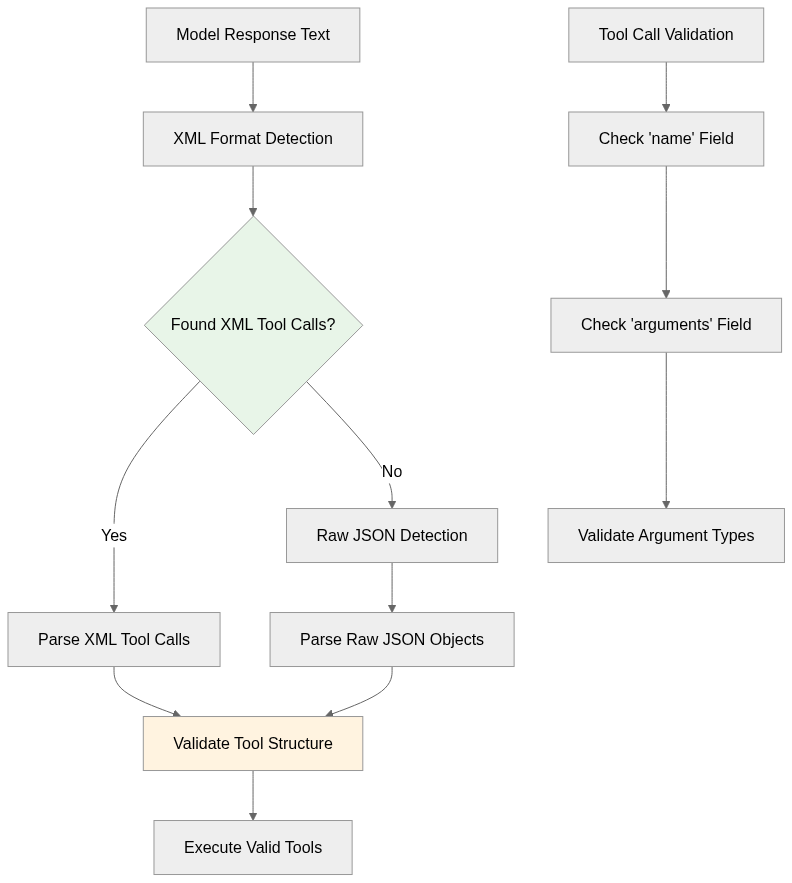
In the diagram, the model response flows into XML format detection. If XML tool calls exist, they are parsed directly. If not, raw JSON detection is attempted. Both paths eventually converge into validation, where we check the presence of required fields and argument types. Once validation succeeds, the tools are executed. Separately, a validation node breaks down the checks: first ensuring a name exists, then checking arguments, and finally verifying the argument types.
Permalink: tool_handler.py blob
The first important function is run_deepforest_object_detection. This is the execution point of the DeepForest tool, which performs object detection on the user’s image. The function begins by checking if the session exists, since every detection must be tied to a session. If no session or no image is found, it returns an error message. This protects against the common issue where the model attempts to call the tool without any uploaded image. The actual detection step uses the DeepForestPredictor to run predictions either on the image path or on the numpy array of the current image. The results include a detection summary, annotated image, and detection data. If available, the annotated image is stored back in the session state.
deepforest_predictor = DeepForestPredictor()

def run_deepforest_object_detection(session_id: str, model_names: List[str] = ["tree", "bird", "livestock"], patch_size: int = Config.DEEPFOREST_DEFAULTS["patch_size"], patch_overlap: float = Config.DEEPFOREST_DEFAULTS["patch_overlap"], iou_threshold: float = Config.DEEPFOREST_DEFAULTS["iou_threshold"], thresh: float = Config.DEEPFOREST_DEFAULTS["thresh"], alive_dead_trees: bool = Config.DEEPFOREST_DEFAULTS["alive_dead_trees"]) -> Dict[str, Any]:
    """Run DeepForest object detection on the globally stored image."""
    # Validate session exists
    if not session_state_manager.session_exists(session_id):
        return {
            "detection_summary": f"Session {session_id} not found.",
            "detections_list": [],
            "status": "error"
        }

    image_file_path = session_state_manager.get(session_id, "image_file_path")
    current_image = session_state_manager.get(session_id, "current_image")

    if image_file_path is None and current_image is None:
        return {
            "detection_summary": f"No image available for detection in session {session_id}.",
            "detections_list": [],
            "status": "error"
        }

    if image_file_path and not validate_image_path(image_file_path):
        print(f"Warning: Invalid image file path {image_file_path}, falling back to PIL image")
        image_file_path = None

    try:
        if image_file_path:
            print(f"DeepForest: Processing image from file path: {image_file_path}")
            detection_summary, annotated_image, detections_list = deepforest_predictor.predict_objects(
                image_file_path=image_file_path,
                model_names=model_names,
                patch_size=patch_size,
                patch_overlap=patch_overlap,
                iou_threshold=iou_threshold,
                thresh=thresh,
                alive_dead_trees=alive_dead_trees
            )
        else:
            print(f"DeepForest: Processing PIL image (size: {current_image.size})")
            image_array = np.array(current_image)
            detection_summary, annotated_image, detections_list = deepforest_predictor.predict_objects(
                image_data_array=image_array,
                model_names=model_names,
                patch_size=patch_size,
                patch_overlap=patch_overlap,
                iou_threshold=iou_threshold,
                thresh=thresh,
                alive_dead_trees=alive_dead_trees
            )

        if annotated_image is not None:
            session_state_manager.set(session_id, "annotated_image", Image.fromarray(annotated_image))

        result = {
            "detection_summary": detection_summary,
            "detections_list": detections_list,
            "total_detections": len(detections_list),
            "status": "success"
        }

        return result

    except Exception as e:
        error_msg = f"Error during image detection in session {session_id}: {str(e)}"
        print(f"DeepForest Detection Error: {error_msg}")
        return {
            "detection_summary": error_msg,
            "detections_list": [],
            "total_detections": 0,
            "status": "error"
        }
The second function is extract_all_tool_calls. Models output tool calls in inconsistent formats - sometimes wrapped in XML tags, sometimes as raw JSON objects, and sometimes with formatting variations. I implemented a two-tier extraction approach. My first approach was to look for XML-style wrappers (<tool_call>{...}</tool_call>). Inside those blocks, I attempt to parse JSON. If valid, I check for the required fields and add the result to the list of tool calls.
# Method 1: Wrapped in XML
xml_pattern = r'<tool_call>\s*(\{.*?\})\s*</tool_call>'
xml_matches = re.findall(xml_pattern, text, re.DOTALL)

for match in xml_matches:
    try:
        result = json.loads(match.strip())
        if isinstance(result, dict) and "name" in result and "arguments" in result:
            print(f"Found valid XML tool call: {result}")
            tool_calls.append(result)
    except json.JSONDecodeError as e:
        print(f"Failed to parse XML tool call JSON: {e}")
        continue
However, in many cases, the model just emits raw JSON objects without wrappers. To solve this, I added a second method using Python JSONDecoder to iteratively scan through text for JSON objects. Each time I find a valid object with name and arguments, it gets added to the tool call list.
# Method 2: If no XML format found, try raw JSON format
if not tool_calls:
    decoder = JSONDecoder()
    brace_start = 0

    while True:
        match = text.find('{', brace_start)
        if match == -1:
            break
        try:
            result, index = decoder.raw_decode(text[match:])
            if isinstance(result, dict) and "name" in result and "arguments" in result:
                print(f"Found valid raw JSON tool call: {result}")
                tool_calls.append(result)
                brace_start = match + index
            else:
                brace_start = match + 1
        except ValueError:
            brace_start = match + 1
The function handle_tool_call executes a tool after it has been extracted and validated. It first prints out the tool name and arguments for transparency. Then it matches the tool name against available tools. Currently, only this run_deepforest_object_detection is supported. If the tool name matches, the function attempts to call it with the given arguments, passing along the session ID.
def handle_tool_call(tool_name: str, tool_arguments: Dict[str, Any], session_id: str) -> Union[str, Dict[str, Any]]:
    """Execute validated tool calls with error handling."""
    if tool_name == "run_deepforest_object_detection":
        try:
            result = run_deepforest_object_detection(session_id=session_id, **tool_arguments)
            return result
        except Exception as e:
            error_msg = f"Error executing {tool_name} in session {session_id}: {str(e)}"
            print(f"Tool Execution Failed: {error_msg}")
            return error_msg
    else:
        error_msg = f"Unknown tool: {tool_name}"
        print(f"Unknown Tool: {error_msg}")
        return error_msg
Caching System
Repeated tool calls with identical parameters are expensive and unnecessary. I implemented a caching system to improve efficiency, as I did previously for the Gemini Agent.
The workflow starts when a tool call request is made, triggering the generation of a cache key based on the tool name and its normalized arguments. This key is hashed using MD5 to ensure a compact, unique identifier. The system then checks if a result for this key already exists in the cache. If it does, the cached result, including any annotated images, is returned immediately, avoiding redundant computations. If no cache entry is found, the tool is executed, and the fresh results, along with any generated images, are stored in the cache for future use.

Permalink: cache_utils.py blob
The cache utility I implemented, ToolCallCache, is designed to avoid redundant tool executions by storing previous results along with annotated images. I created a system that generates a unique cache key for each tool call based on the tool name and normalized arguments. Normalization ensures that minor differences in argument order or defaults don’t create unnecessary duplicate cache entries. MD5 hashing of the normalized JSON provides a consistent and compact key for storage and retrieval.
def _normalize_arguments(self, arguments: Dict[str, Any]) -> str:
    """Create consistent cache key from arguments."""
    normalized_args = Config.DEEPFOREST_DEFAULTS.copy()
    normalized_args.update(arguments)
    if "model_names" in arguments:
        normalized_args["model_names"] = arguments["model_names"]

    print(f"Cache normalization: {arguments} -> {normalized_args}")
    return json.dumps(normalized_args, sort_keys=True, separators=(',', ':'))

def _create_cache_key(self, tool_name: str, arguments: Dict[str, Any]) -> str:
    """Create unique cache key from tool name and arguments."""
    cache_input = f"{tool_name}:{self._normalize_arguments(arguments)}"
    return hashlib.md5(cache_input.encode('utf-8')).hexdigest()
Uploaded images can be large, and naive storage would quickly consume disk space. To address this, I implemented _store_image which serializes images using pickle and compresses them with gzip. This preserves all image metadata while reducing file size. A fallback method converts images to base64-encoded bytes in case serialization fails. Loading uses _load_image, which reconstructs the image safely from disk.
Retrieval is handled by get_cached_result, which checks if a cache entry exists for a given tool name and arguments. If found, it reconstructs the full result, including detection summaries, detection lists, totals, and annotated images.
Additional utility functions, like get_cache_stats and cleanup_cache_files, provide operational visibility and housekeeping. get_cache_stats calculates total entries, total images cached, total detections, cache size, and unique tools stored, giving a clear overview of cache usage. cleanup_cache_files removes stored image files safely from disk, ensuring that temporary storage does not accumulate indefinitely.
Next Steps
The next steps will focus on completing the pipeline for structured agent outputs and efficient image handling. First, I plan to add a tile manager to handle image tiling for the visual agent. Large aerial images are too big for a single inference pass, so this component will split images into manageable tiles.
Second, a JSON manager will centralize all responses, results, and intermediate data. Each agent: visual, DeepForest detector, and ecology, will write to this JSON manager. It will serve as the single source of truth for session data. Alongside this, I will lay out prompt templates to standardize agent responses, ensuring the JSON manager receives predictable structured content for parsing and reasoning.
Finally, the remaining steps involve implementing the memory agent, visual analysis agent, DeepForest detector agent, and ecology agent.


