DeepForest Multi-Agent Part 3: Tile Management, JSON Synthesis, and Prompt Engineering

I am an AI/ML enthusiast with a strong passion for bridging technology and social impact. I love solving complex problems whether it's solving confusion on any AI/ML concept or building LLM systems for real-world applications.
Moving forward, I added a tile manager to handle image tiling for the visual agent and distribute detections across those tiles. Finally, I implemented a JSON manager where all responses and results are stored, which will also serve as input to the ecology agent for synthesis. Prompt templates to standardize agent responses, ensuring the JSON manager receives predictable structured content for parsing and reasoning.
Tile Management System
The tile manager addresses a critical performance challenge in processing large ecological images. Large aerial images need to be broken into manageable tiles for detailed visual analysis while maintaining spatial relationships for ecological interpretation.
Permalink: tile_manager.py blob
Performance-Driven Tile Size Selection
The first major decision involved optimizing tile sizes for different processing stages. The Visual Analysis Agent takes 30-35 seconds to analyze an image. Through testing with various image sizes, I discovered significant performance differences:
Processing Time Analysis:
400 patch_size: Creates 468 tiles for 9626x6646 image → 3+ hours total processing
1000 patch_size: Creates 77 tiles for same image → 1 hour processing
1500 patch_size: Creates 35 tiles → 20-30 minutes processing
Design Decision: I use different patch sizes for different purposes. Visual analysis agents use 1000-pixel patches for efficiency, while DeepForest detection maintains 400-pixel patches for accuracy. This dual-approach balances processing speed with detection precision.
Flexible Tiling Implementation
The tile manager supports multiple tiling methods with automatic fallback:
def tile_image_for_analysis(
    image: Image.Image,
    patch_size: int = Config.DEEPFOREST_DEFAULTS["patch_size"],
    patch_overlap: float = Config.DEEPFOREST_DEFAULTS["patch_overlap"],
    image_file_path: Optional[str] = None,
) -> Tuple[List[Image.Image], List[Dict[str, Any]]]:
Method 1 - SlidingWindow with Raster Support: For GeoTIFF files, the system reads dimensions directly from raster metadata without loading the entire image into memory. This prevents memory overflow on large satellite imagery. I got this idea upon observing the implementation of the DeepForest TiledRaster class in src/deepforest/datasets/prediction.py file.
if image_file_path:
    try:
        with rio.open(image_file_path) as src:
            height = src.shape[0]
            width = src.shape[1]
            method = "slidingwindow_raster"
        print(f"Using raster dimensions: {width}x{height} from file path")
    except Exception as raster_error:
        print(f"Raster reading failed: {raster_error}, using PIL image dimensions")
When slidingwindow_raster method is true and an image_file_path is provided, it attempts to open the raster file using Rasterio and read the specific tile defined by (x, y, w, h). If the read data has three dimensions, the array is transposed into the conventional (height, width, channels) format for image processing. Since raster data often isn’t in uint8 format, the code normalizes values: if the maximum is ≤ 1.0, it scales up to 255; otherwise, it simply casts to uint8. The processed array is then converted into a PIL image for consistency. Each tile’s dimensions are logged to help trace execution. If Rasterio fails (e.g., due to corrupted or unsupported data), the code gracefully falls back to cropping directly from the original PIL image, ensuring the tiling process continues without crashing.
if method == "slidingwindow_raster" and image_file_path:
    try:
        with rio.open(image_file_path) as src:
            window_data = src.read(window=Window(x, y, w, h))
            if window_data.ndim == 3:
                window_data = window_data.transpose(1, 2, 0)

            if window_data.dtype != np.uint8:
                if window_data.max() <= 1.0:
                    window_data = (window_data * 255).astype(np.uint8)
                else:
                    window_data = window_data.astype(np.uint8)

            tile_pil = Image.fromarray(window_data)
            print(f"Tile {i}: Read raster data {window_data.shape} -> PIL {tile_pil.size}")

    except Exception as raster_read_error:
        print(f"Failed to read raster tile {i}: {raster_read_error}")
        tile_pil = image.crop((x, y, x + w, y + h))
        print(f"Tile {i}: Fallback PIL crop -> {tile_pil.size}")
Method 2 - SlidingWindow with PIL: For standard image formats, uses PIL dimensions with the slidingwindow library for consistent tiling patterns.
width, height = image.size
tile_pil = image.crop((x, y, x + w, y + h))
Method 3 - DeepForest Preprocess Fallback: When slidingwindow is unavailable, falls back to DeepForest's built-in preprocessing functions.
from deepforest import preprocess

numpy_image = np.array(image)

if numpy_image.shape[2] == 4:
    numpy_image = numpy_image[:, :, :3]
elif numpy_image.shape[2] != 3:
    raise ValueError(f"Image must have 3 channels (RGB), got {numpy_image.shape[2]}")

numpy_image = numpy_image.transpose(2, 0, 1)
numpy_image = numpy_image / 255.0
numpy_image = numpy_image.astype(np.float32)

windows = preprocess.compute_windows(numpy_image, patch_size, patch_overlap)
Spatial Detection Distribution System
The most complex aspect involves mapping DeepForest detections (generated at 400-pixel patches) to visual analysis tiles (generated at 1000-pixel patches).
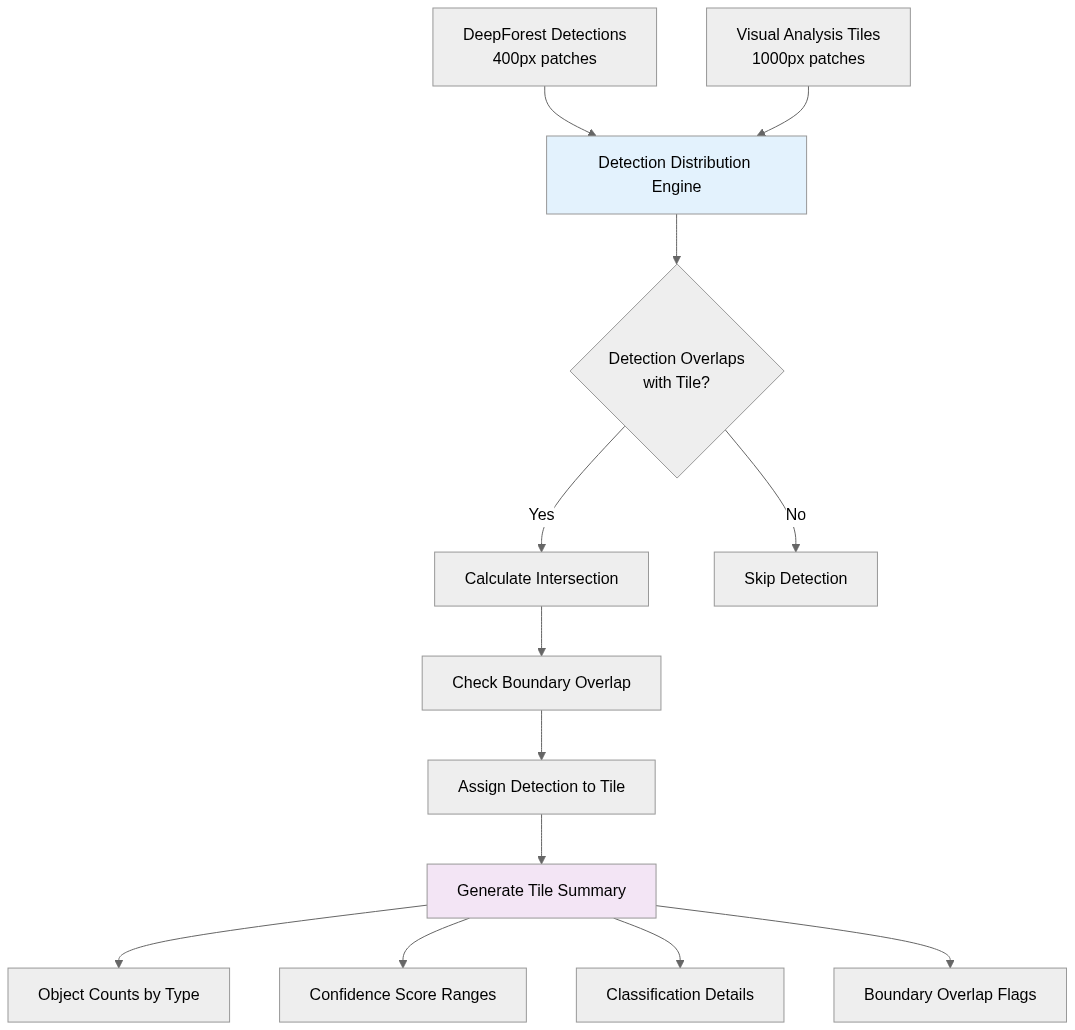
The distribution algorithm performs geometric intersection calculations for every detection:
def distribute_detections_to_tiles(
    detection_results: List[Dict[str, Any]],
    tile_metadata: List[Dict[str, Any]]
) -> Dict[int, List[Dict[str, Any]]]:
Step 1: Intersection Detection: For each detection bounding box (xmin, ymin, xmax, ymax), check if it overlaps with each tile's coordinates (x, y, width, height).
if (det_xmin < tile_xmax and det_xmax > tile_xmin and
    det_ymin < tile_ymax and det_ymax > tile_ymin):
Step 2: Boundary Analysis: Determine if detections extend beyond tile boundaries, which indicates objects spanning multiple spatial regions.
detection_copy["overlaps_tile_boundary"] = (
    det_xmin < tile_xmin or det_xmax > tile_xmax or
    det_ymin < tile_ymin or det_ymax > tile_ymax
Step 3: Tile Assignment: Assign detections to all overlapping tiles, enabling spatial analysis of object distributions.
Comprehensive Tile Detection Summaries
Each tile receives a detailed summary analyzing all assigned detections, which happens in generate_tile_detection_summary function.
Summary Components:
Object counts by type (birds, trees, livestock)
Classification details (alive/dead trees when enabled)
Confidence score ranges: Low (0.0-0.3), Medium (0.3-0.7), High (0.7-1.0)
Boundary overlap information for objects spanning multiple tiles
Tool call parameters used for detection
Example Summary Output: "According to the DeepForest tool call with model_names set to ['bird'], 106 birds are detected. Among them the bird at location (967, 183) to (1006, 221) with confidence score 0.547 overlaps tile boundary, the bird at location (999, 640) to (1026, 664) with confidence score 0.404 overlaps tile boundary, the bird at location (980, 979) to (1007, 997) with confidence score 0.237 overlaps tile boundary, the bird at location (947, 380) to (1009, 440) with confidence score 0.212 overlaps tile boundary. From 0.0 to 0.3 confidence score, there are 48 birds are found. From 0.3 to 0.7 confidence score, there are 58 birds are found.”
These detailed summaries provide the ecology agent with the precise spatial context needed.
JSON Management System
The JSON manager creates a comprehensive, structured representation of all analysis results that serves as input for the ecology agent's synthesis process.
Structured JSON Architecture
The JSON structure captures every aspect of the multi-agent analysis:
{
  "session_id": "string",
  "user_query": "string",
  "image_info": {
    "image_size": [width, height],
    "image_mode": "string",
    "image_file_path": "string"
  },
  "image_quality": {
    "image_quality_for_deepforest": "Yes/No",
    "deepforest_objects_present": ["array of strings"],
    "resolution_info": "object"
  },
  "tiles": [{
    "tile_id": "integer",
    "coordinates": {"x": "int", "y": "int", "width": "int", "height": "int"},
    "metadata": {"patch_size": "int", "overlap": "float"},
    "visual_analysis": "string",
    "tile_detection_summary": "string"
    "additional_objects": "array",
    "assigned_deepforest_detections": "array"
  }],
  "detection_summary_for_the_whole_image": "string",
  "ecology_response": "string",
  "is_complete": "boolean"
}
This structure enables the ecology agent to perform spatial reasoning by correlating visual analysis text with quantitative detection data for specific image regions.
initialize_comprehensive_json function sets up the baseline JSON structure for a new session. Every downstream step (image quality, tile analysis, detections, ecology response) needs a structured container. It pulls the current image and file path from the session manager, then builds a JSON with session ID, user query, basic image metadata, and placeholders for later fields. It immediately saves this JSON back into the session state so all agents can append data consistently.
add_image_quality_to_json function records image quality checks into the JSON. Large images are processed tile-by-tile, and each tile’s metadata, analysis, and detections must be tracked separately. Normalizes tile info into a consistent format (IDs, coordinates, metadata, visual analysis text, additional objects, etc.), appending it to the tiles array in the JSON, and saving it back.
add_deepforest_results_to_json function handles the heavy lifting of merging DeepForest detections into the JSON. It centralizes all tool outputs, removes duplicates, and maps detections to their corresponding tiles. It iterates through tool results, collecting detections, recording tool call info (cache hits, arguments, IDs), deduplicating bounding boxes, and then calling distribute_detections_to_tiles to assign detections back to each tile. It also attaches tool call metadata to each tile and updates summaries both at the tile level and for the entire image. Essentially, this function bridges raw DeepForest output with structured JSON storage.
add_ecology_response_to_json function finalizes the JSON by appending the ecology agent’s synthesized response.
get_comprehensive_json function is just retrieval. It asks the session manager for the comprehensive_json under the given session ID and returns it, defaulting to an empty dict if nothing exists.
Prompt Engineering Strategy
The prompt template system follows established natural language engineering principles, where longer, more detailed prompts consistently produce better-structured outputs from language models.
I implemented each template by starting with a clear role assignment that establishes the agent's identity and capabilities - for example, "You are a conversation memory manager for an ecological data analytics assistant" for the memory agent, or "You are a computer vision expert" for the visual analysis agent.
Following role establishment, I provide comprehensive user context and background information that varies by agent type: the memory agent receives JSON history containing all previous user queries, agent responses, and tool results from the entire session, while the ecology agent receives both this historical context plus the current comprehensive JSON containing all tile analyses and detection results from the ongoing processing cycle.
After context provision, I establish the desired tone and response style for each agent: professional and analytical for the memory agent, expert and detailed for visual analysis, reasoning-focused for the detector agent, and helpful yet informative for the ecology agent.
The most critical aspect involves setting explicit rules against hallucination, though I continue to encounter synthesis hallucination issues with the ecology agent when processing comprehensive JSON data; my mentor suggested that raw JSON isn't optimal for querying. passing. So, I plan to provide summarized data instead in future iterations to reduce the cognitive load that leads to fabricated details.
Each template concludes with precise formatting instructions that specify the exact structure agents must follow. For example, the memory agent's three-part ANSWER_PRESENT/JSON_CACHE/RELEVANT_CONTEXT format, the visual agent's full image analysis format IMAGE_QUALITY/OBJECTS_PRESENT/VISUAL_ANALYSIS, individual tile image analysis format ADDITIONAL_OBJECTS/VISUAL_ANALYSIS structure, the detector agent's reasoning-then-tool-calls format, and the ecology agent's comprehensive synthesis structure with specific requirements for citing confidence scores and tile coordinates.
For the detector agent specifically, I embedded detailed tool schema instructions that explain each DeepForest parameter's purpose and constraints, enabling intelligent parameter selection based on user queries and visual analysis results rather than relying on static defaults.
Permalink: prompt_templates.py blob
Next Steps
I have successfully established all the necessary utilities for building a comprehensive multi-agent ecological analysis system. Next, I will implement the complete agent orchestration system that coordinates all four agents (memory, visual analysis, detector, and ecology) through the established workflow, and integrate comprehensive logging functionality that records all agent interactions, tool executions, parsing results, and error conditions for debugging and system monitoring. I will also develop the user interface implementation that provides an intuitive way for users to interact with the system, upload images, submit queries, and receive structured ecological analysis results. The combination of these components will create a production-ready multi-agent system.


