Week 3: Initiating the Implementation of Gemini Multimodal Integration

I am an AI/ML enthusiast with a strong passion for bridging technology and social impact. I love solving complex problems whether it's solving confusion on any AI/ML concept or building LLM systems for real-world applications.
Introduction to Gemini Integration for DeepForest Agent
This week, I focused on starting the implementation of integrating Gemini multimodal. I chose the "gemini-2.0-flash", which is a multimodal large language model (LLM) designed for high-speed, cost-effective performance on a wide range of everyday tasks, including image understanding. It also excels in image understanding because of its native multimodal capabilities and advanced reasoning. Our system also combines conversational AI that has image understanding capabilities with the DeepForest Object Detection. The main challenge was creating a hybrid agent that—
Provides DeepForest Object Detection Analysis based on User Query
Provides a vision analysis
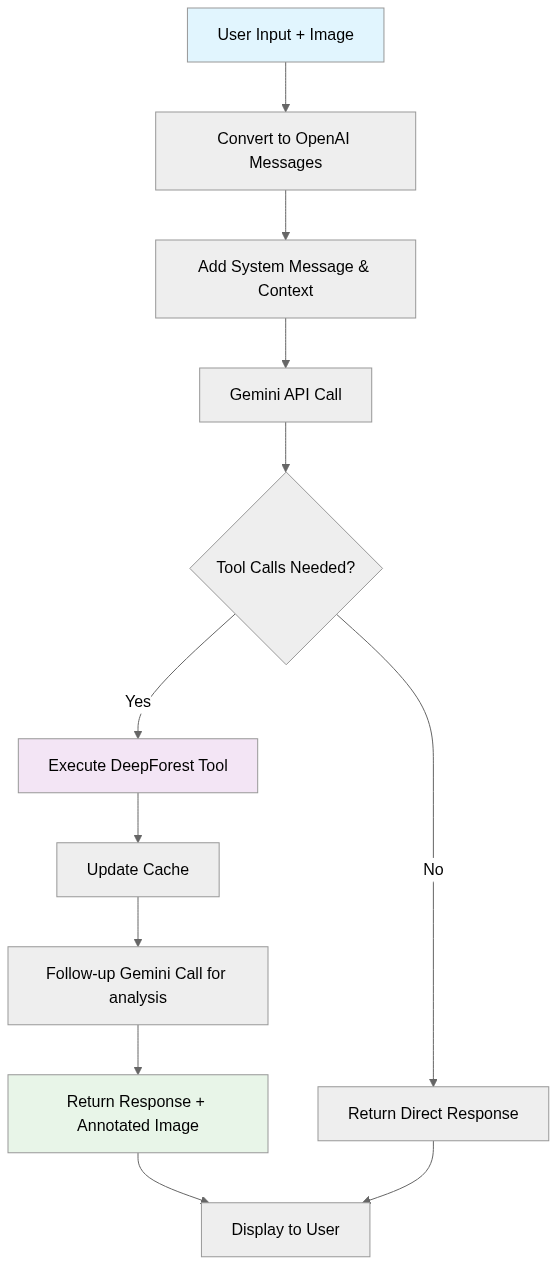
Possible Agent Workflow for src/deepforest_agent/agents/gemini_agent.py
I plan to follow this workflow to implement the gemini_agent.py. This week, I plan to implement the important components, like setting up the system prompt, passing images to see how the agent is working with the current approach. The workflow will start with the user providing an ecological image along with a query, which will then be converted into OpenAI-compatible messages. A system message and the image in base64 format will be added to the messages before making a call to the Gemini API. The workflow will check if DeepForest object detection tool calls are provided. If so, it will execute the DeepForest tool, update the detection cache, and make a follow-up Gemini call with the tool result for detailed analysis. The response, along with an annotated image, will be returned. If no tool calls are required, the workflow will return the first response.
OpenAI-Compatible Messages
I am using OpenAI-compatible messages to structure the user input, system context and the image in a format that the Gemini API can reliably interpret. OpenAI-compatible messages are structured data of message objects, used in API requests to interact with language models, where each object has a role (e.g., user, assistant, system) and a content field. The content can be a string for text or an array of objects for multimodal inputs (text, image URLs, files). Since Gemini models are easily accessible through OpenAI, I plan to use the following formats for DeepForest agent implementation:
GeminiAgent Class Structure
For starters, I am using the GeminiAgent class as the only orchestrator for all AI interactions to not overcomplicate things. I went through the documentation for Gemini models and OpenAI-compatible messages thoroughly before implementation. I leveraged OpenAI's interface to communicate with the “gemini-2.0-flash” model through their OpenAI-compatible endpoint. I encountered several errors, such as 429 RESOURCE_EXHAUSTED, 503 UNAVAILABLE, due to network instability and temporary server overload. So, I set max_retries=5 in the Gemini API to tell the API client to automatically retry a failed request. I also created an instance of the DeepForestPredictor class and assigned it to the GeminiAgent to use this object whenever I need to run tree detection or image analysis on the user’s input.
class GeminiAgent:
    def __init__(self):
        self.client = openai.OpenAI(
            api_key=Config.GOOGLE_API_KEY,
            base_url="https://generativelanguage.googleapis.com/v1beta/openai/",
            max_retries=5,
            timeout=60.0
        )
        self.model_name = "gemini-2.0-flash"
        self.messages = []
        self.deepforest_predictor = DeepForestPredictor()
Tool Declaration and System Prompt Design
The most critical component was crafting a system message that would guide the agent’s behaviour and the tool declaration for the deepforest_predict_objects tool. For the tool declaration, I went through the “API Reference” in the DeepForest documentation as well as the repository. Here’s how I designed it initially:
def _get_deepforest_tool_declaration(self) -> dict:
    """
    Generate OpenAI function declaration for DeepForest integration.

    Returns:
        Tool declaration with parameter specifications using class variables
    """
    return {
        "type": "function",
        "function": {
            "name": "deepforest_predict_objects",
            "description": (
                "Performs object detection using DeepForest with full parameter control. "
            ),
            "parameters": {
                "type": "object",
                "properties": {
                    "image_data_array": {
                        "type": "string",
                        "description": "Base64 encoded image data (automatically provided from uploaded image)."
                    },
                    "model_names": {
                        "type": "array",
                        "items": {"type": "string"},
                        "description": f"List of DeepForest model names to use (e.g., [\"bird\", \"tree\"]). Defaults to {DetectionParameters.get_default_model_names()} if not specified."
                    },
                    "patch_size": {
                        "type": "integer",
                        "description": f"Patch size for detection windows. Any value is supported (default: {DetectionParameters.patch_size}). Larger values process bigger areas at once. Setting this will automatically use predict_tile method.",
                        "default": DetectionParameters.patch_size
                    },
                    "patch_overlap": {
                        "type": "number",
                        "description": f"Overlap ratio between patches (0.0-1.0),
                        "default": DetectionParameters.patch_overlap
                    },
                    "iou_threshold": {
                        "type": "number",
                        "description": f"IoU threshold for non-maximum suppression (0.0-1.0). (default: {DetectionParameters.iou_threshold})",
                        "default": DetectionParameters.iou_threshold
                    },
                    "thresh": {
                        "type": "number",
                        "description": f"Confidence threshold for detections (0.0-1.0). (default: {DetectionParameters.thresh})",
                        "default": DetectionParameters.thresh
                    },
                    "return_plot": {
                        "type": "boolean",
                        "description": f"Whether to return an annotated image plot. Should always be True for user interaction. (default: {DetectionParameters.return_plot})",
                        "default": DetectionParameters.return_plot
                    },
                    "alive_dead_trees": {
                        "type": "boolean",
                        "description": f"Enable alive/dead tree classification. Forces use of predict_tile method. (default: {DetectionParameters.alive_dead_trees})",
                        "default": DetectionParameters.alive_dead_trees
                    }
                },
                "required": ["image_data_array", "model_names"]
            }
        }
    }
To design the system prompt, I spent considerable time refining this and still plan to keep refining it until I get the desired responses. To design a system prompt for the agent, I need to assign it a role first. Since this agent will focus on image understanding and ecological analysis based on the DeepForest tool, I assigned the role like this—
You are an intelligent ecological analysis assistant with deep knowledge of wildlife, forestry, environmental science, and image analysis. You have access to DeepForest's object detection system as a supporting tool, And you have excellent native computer vision capabilities.
Then I set the tone and behaviour of the agent—
ANSWER DIRECTLY:
    - Always provide a direct, immediate response to user queries
    - Use your native vision analysis first to give an initial answer
    - Automatically use DeepForest tools when they would enhance your analysis
    - Never ask for permission or confirmation to use tools
    - Never say "I will analyze..." or "I can do..." - just do it and provide results
    - Structure responses to answer the user's question immediately, then enhance with tool data
Then, I assigned the capabilities—
NATIVE VISION CAPABILITIES:
    - USE YOUR VISION: Analyze images directly for species identification, behavior, habitat assessment
    - ECOLOGICAL INSIGHTS: Provide expert analysis of ecological patterns, relationships, conditions
    - DETAILED DESCRIPTIONS: Describe what you see in images using your computer vision
    - NEST DETECTION: You can identify nests, eggs, and behaviors directly from images
    - SPECIES ANALYSIS: Use your knowledge to identify or suggest species when possible

HYBRID APPROACH:
    - DeepForest: Precise bounding boxes, exact counts, spatial coordinates
    - Your Vision: Species identification, behavioral analysis, ecological context, detailed descriptions
    - Combined: Complete ecological analysis with quantitative precision
Then, I provided the tool usage guidelines as below, so that the agent can intelligently choose parameters for tool calls whenever necessary:
TOOL USAGE GUIDELINES:
    - Use DeepForest for: Exact counts, precise locations, bounding boxes, detection confidence scores. Before calling deepforest_predict_objects, check if the requested detection has already been performed for the current image
    - If user asks about objects already detected in this conversation, use cached results instead of re-running detection
    - Only call the tool if: (1) it's a new image, (2) you need to detect different object types, or (3) different detection parameters are needed
    - Use your vision for: Species ID, behavior analysis, habitat assessment, ecological insights, spatial relationships, other objects not covered by DeepForest models (e.g., nests, eggs, behaviors) and general ecological conditions.
    - Combine both for: Comprehensive ecological reports with quantitative and qualitative analysis

TOOL INSTRUCTIONS:
    1. Understanding the User's Intent:
        * Begin by interpreting what the user is asking — whether it's about identifying ecological entities (e.g., birds, trees, livestock), analyzing conditions (e.g., tree health, species presence), or something more specific.
        * Check if the requested objects have already been detected for the current image before calling the tool.
    2. Tool Invocation Decision:
        * Check if the requested detection has already been performed
        * Automatically call deepforest_predict_objects if new detection would be valuable
        * If the user does not specify what objects to detect and no detection has been done, automatically call with default models: ["bird", "tree", "livestock"]
        * If asking about previously detected objects, use cached results
    3. Tool Parameters Customization:
        * Apply any user-provided values for `patch_size`, `patch_overlap`, `iou_threshold`, and `thresh` in the tool call.
        * Set `alive_dead_trees` to True along with the detection model "tree" when user wants something about tree healths or dead/alive trees or tree state.
Finally, I set the response structure as below—
RESPONSE STRUCTURE - CRITICAL FOR IMMEDIATE ANSWERS:
  Always structure response in four parts:
    1. **Immediate Analysis**: Start with your direct vision analysis and answer the user's question immediately
    2. **Tool Enhancement**: Use DeepForest automatically when it adds value to your analysis
    3. **Integrated Results**: Combine your insights with tool data for complete analysis
    4. **Data Formatting**: Always honor user requests for specific data formats
All of these are combined and returned from _set_system_message. I got a lot of hallucinated responses whenever I include the DeepForest Detection data. Sometimes, the response structure is not maintained as the system message. The tool calls and vision analysis are, however, properly maintained.
Message Conversion System
The _convert_gradio_to_openai_messages method will convert Gradio inputs into OpenAI-compatible messages. It adds a system message for context, then combines the user’s prompt and encoded image (if provided) into structured content blocks. The final message list is returned, ready for Gemini API calls. I still did not include the previous messages since I don’t have my Gradio interface ready yet. For now, only the system prompt, user prompt and the image are structured for the first API call.
def _convert_gradio_to_openai_messages(self, gradio_history: List[dict],
                                     current_prompt: str, image_path: str) -> List[dict]:
    openai_messages = []

    system_content = self._set_system_message()
    openai_messages.append({"role": "system", "content": system_content})

    if current_prompt and image_path:
        try:
            image_array = load_image_as_np_array(image_path)
            data_url = encode_image_to_base64_url(image_array)
        except Exception as e:
            print(f"Error encoding image file to base64: {e}")
            data_url = None

        if data_url is None:
            print(f"Warning: Could not encode image {image_path} to base64")
            openai_messages.append({"role": "user", "content": current_prompt})
        else:
            content_blocks = [{"type": "text", "text": current_prompt}]
            content_blocks.append(
                {"type": "image_url", "image_url": {"url": data_url, "detail": "auto"}}
            )
            openai_messages.append({"role": "user", "content": content_blocks})

    return openai_messages
Running on a Sample image
I tried to run the first API call on a sample image data/AWPE Pigeon Lake 2020 DJI_0005.JPG to see how it’s working so far. In the model_response method, I put together a sample query and image to see if it works.
def model_response():
    gradio_history = []
    image_path = 'data/AWPE Pigeon Lake 2020 DJI_0005.JPG'
    user_prompt = "What are the birds doing?"

    self.messages = self._convert_gradio_to_openai_messages(gradio_history, user_prompt, image_path)
    tools = [self._get_deepforest_tool_declaration()]

    response = self.client.chat.completions.create(
        model=self.model_name,
        messages=self.messages,
        tools=tools,
        tool_choice="auto",
    )

    print(response)

model_response()
As a result, I got this response below.

For now, it can call the tool according to the user query, and it also provides a relevant visual response. But the format needs to be improved.
Plans for Next Week
This week, I built a base for the Gemini integration for DeepForest Agent. I faced a lot of hallucination issues at the beginning with tool calls. After refining the tool instructions in the system prompt, I got a satisfactory tool call from the Gemini first call. Next week, I will focus on implementing tool result fetching and designing the follow-up API call so that Gemini can interpret DeepForest results. I will also integrate a caching system to avoid redundant detections and start building a parameter management system to give more flexibility in controlling detection behavior.


