Week 1 and 2: DeepForest Tool Implementation

I am an AI/ML enthusiast with a strong passion for bridging technology and social impact. I love solving complex problems whether it's solving confusion on any AI/ML concept or building LLM systems for real-world applications.
DeepForest library provides pretrained models for detecting trees and other ecological objects in aerial or field imagery, supporting both predict_image for standard images and predict_tile for large raster images like TIFFs.
My target was to implement the DeepForest tool integration for ecological object detection within the agent framework. The implementation provides support for detecting trees, birds, and livestock while maintaining flexibility for future model extensions. I also included the CropModel Implementation to classify dead/alive trees.
Configuration Setup: src/deepforest_agent/conf/config.py
I designed a configuration file to serve as the central hub for model definitions, visualization configuration, and environment-dependent variables. The configuration file contains all model definitions and visualization settings in the Config class of src/deepforest_agent/conf/config.py.
Permalink: config.py blob at commit 187129a
The model mapping approach connects the link to their corresponding DeepForest model, supporting bird detection, general tree detection, and livestock identification. I chose this abstraction to decouple the user interface from specific model paths, enabling model updates without changing the core detection logic.
DEEPFOREST_MODELS = {
    "bird": "weecology/deepforest-bird",
    "tree": "weecology/deepforest-tree",
    "livestock": "weecology/deepforest-livestock"
}
The color definition establishes bounding box visualization using BGR (Blue-Green-Red) color tuples for each detection class. The reason I selected BGR color tuple is to maintain direct compatibility with OpenCV operations, avoiding repeated color space conversions during visualization.
COLORS = {
    "bird": (0, 0, 255),      # Red (BGR)
    "tree": (0, 255, 0),      # Green (BGR)
    "livestock": (255, 0, 0), # Blue (BGR)
    "alive_tree": (255, 255, 0), # Cyan (BGR)
    "dead_tree": (0, 165, 255) # Orange (BGR)
}
To handle API keys and other sensitive credentials, I integrated environment variables rather than storing them directly in the code.
GOOGLE_API_KEY = os.getenv("GOOGLE_API_KEY", "")
NO_ALBUMENTATIONS_UPDATE = os.getenv("NO_ALBUMENTATIONS_UPDATE", "")
My initial approach was to integrate with the Gemini model, which requires an API key.
I was also getting the ImportError: cannot import name 'functional' from 'albumentations'. After checking issue 1058 in the DeepForest repository, I applied a flag to disable updates in the Albumentations image augmentation library. It is a temporary solution, which I thought of removing later after the issue is resolved.
Image Processing Utilities: src/deepforest_agent/utils/image_utils.py
I started implementing the required utilities related to image processing, as they will be needed often during tool and agent implementation. Initially, I only implemented functionalities like image loading, conversion, and encoding. Since my workflow involves both computer vision tasks (OpenCV, NumPy) and multimodal integrations (base64-encoded inputs), I designed a few helpers to standardize these transformations. I plan to add more utilities as I implement further.
Permalink: image_utils.py blob at commit 187129a
Loading Images as NumPy Arrays
DeepForest takes a NumPy image array or a raster image path. The interface will take the image path as user input. Hence, the load_image_as_np_array function loads an image from disk and returns it as a NumPy array in RGB format. I also normalize any non-RGB images by converting them into RGB to maintain consistency across the pipeline.
Encoding Images as Base64 URLs
When interacting with multimodals or APIs (e.g., Gemini or OpenAI’s endpoints), images are passed as base64-encoded strings instead of raw files. In encode_image_to_base64_url function, I added support for both PNG and JPEG formats, with adjustable quality for JPEG to control size. This function takes a NumPy image array and encodes it into a base64 data URL string. I also handled edge cases like RGBA images by pasting them on a white background before encoding. Otherwise, alpha channels may cause inconsistencies when rendering the image.
Conversion between RGB and BGR image formats
We are working with DeepForest object detection models, which require OpenCV, which expects images in BGR Format. However, PIL/NumPy/most ML frameworks use RGB (Red-Green-Blue) format. So, I wrote these convert_rgb_to_bgr and convert_bgr_to_rgb converter functions using OpenCV’s cvtColor. Both functions only run the conversion if the input truly matches a 3-channel uint8 format.
Problem Analysis and Architecture Decisions
The goal was to create a tool that would call the DeepForest predict_tile or predict_image with appropriate parameters and models. I wanted to integrate both standard object detection and specialized alive/dead tree classification for detailed ecology analysis. Upon reading the predict_tile documentation of the DeepForest library, I decided to go with these default parameters. Here’s the workflow diagram of the deepforest_tool.py:
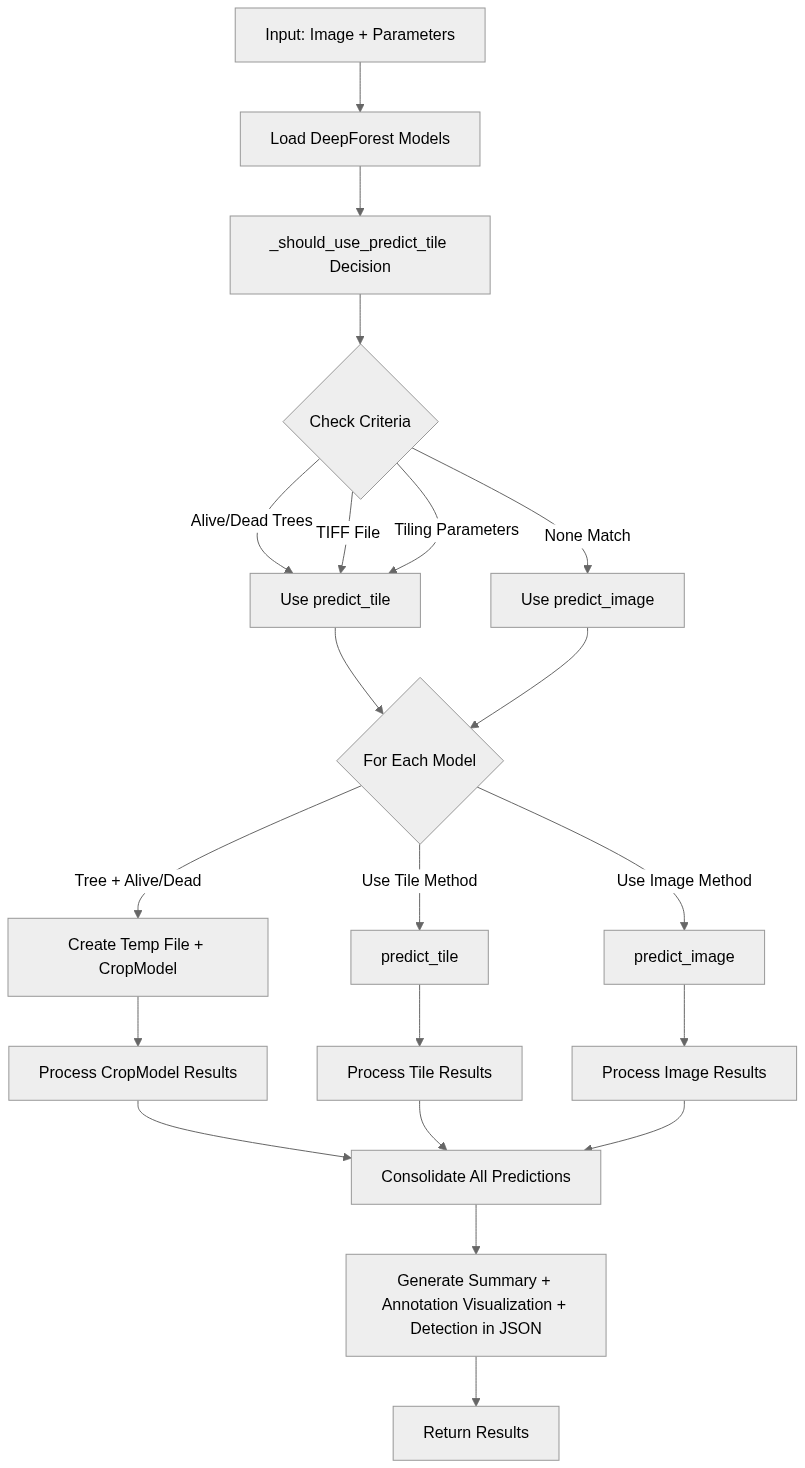
DeepForest Detection Tool Implementation
When I started implementing src/deepforest_agent/tools/deepforest_tools.py, I wanted a unified entry point for running object detection with DeepForest across multiple tasks (trees, birds, livestock, alive/dead tree classification, etc.). As I read the documentation, there were two method usages:
predict_image: Object detection in standard images. It is suitable for small or single images where tiling isn’t necessary.predict_tile:Object Detection in large files (e.g., TIFFs) or images requiring patch-based processing.
If alive/dead tree classification is required
Tiling parameters are mentioned.
I needed a method that could aggregate results from multiple models, and provide outputs in JSON format for multimodal applications (annotated images, JSON). So, I built a predict_objects method that automatically decides which method to use based on file type, user parameters, and task requirements.
Permalink: deepforest_tools.py blob at commit 187129a
_plot_boxes Method
I implemented the _plot_boxes method to annotate images with bounding boxes and labels. This is crucial for users to understand the response based on the annotated image. Based on the prediction dataframe from the DeepForest object detection, I used OpenCV to draw rectangles and labels with a thickness of 2 in the BGR-formatted image array. This will return an annotated NumPy image array in RGB format.
Choosing between predict_tile vs predict_image methods
To choose between the predict_tile and predict_image methods, I implemented the _should_use_predict_tile method, which checks for alive/dead tree classification requests, TIFF format, and tiling parameters (patch_size, patch_overlap) requests. It returns the reasoning containing any of these checks and a boolean decision if the predict_tile method is necessary.
Here’s the logic for _should_use_predict_tile:
# Condition 1: Alive/dead tree classification requires predict_tile
if alive_dead_trees:
    reasons.append("alive/dead tree classification requested")

# Condition 2: TIFF files require predict_tile
if file_extension.lower() in ['.tif', '.tiff']:
    reasons.append("Image is a TIFF file")

# Condition 3: Parameters that require predict_tile
custom_params = []

# If user provides custom parameters that differ from defaults it will use predict_tile
if patch_size != 400:
    custom_params.append(f"patch_size={patch_size}")
if patch_overlap != 0.05:
    custom_params.append(f"patch_overlap={patch_overlap}")
if iou_threshold != 0.15:
    custom_params.append(f"iou_threshold={iou_threshold}")
if thresh != 0.001:
    custom_params.append(f"thresh={thresh}")

if custom_params:
    reasons.append(f"Predict Tile Parameters: {', '.join(custom_params)}")

should_use_tile = len(reasons) > 0
predict_objects Implementation Details
I implemented this method that takes the models list (tree, bird, livestock) according to the user query, DeepForest detection parameters, alive_dead_trees boolean decision if requested, and file_extension parameters.
At first, it loads the models from Config.DEEPFOREST_MODELS based on model_names. Then I called the _should_use_predict_tile to decide whether to use predict_tile or predict_image.
model_instances = {}
for model_name_key in model_names:
    model_path = Config.DEEPFOREST_MODELS.get(model_name_key)
    if model_path is None:
        print(f"Warning: Model '{model_name_key}' not found in "
                f"Config.DEEPFOREST_MODELS. Skipping.")
        continue

    try:
        model = main.deepforest()
        model.load_model(model_name=model_path)
        model_instances[model_name_key] = model
    except Exception as e:
        print(f"Error loading DeepForest model '{model_name_key}' "
                f"from path '{model_path}': {e}. Skipping this model.")
        continue

should_use_predict_tile, decision_reason = self._should_use_predict_tile(
    image_data_array, file_extension, patch_size, patch_overlap,
    iou_threshold, thresh, alive_dead_trees
)
Based on this decision, I iterate for every requested model to get the prediction-
If alive/dead classification is requested, I was passing the NumPy Image array directly to the
predict_tilemethod along with theCropModelinstance. Which resulted in a TypeError like below:
Then, I saved the NumPy image array temporarily to PNG because
CropModelworks on files, not arrays. I created aCropModelinstance and passed it topredict_tile.if model_type == "tree" and alive_dead_trees: with tempfile.NamedTemporaryFile(suffix=".png", delete=False) as tmp_file: temp_file_path = tmp_file.name pil_image = Image.fromarray(image_data_array) pil_image.save(temp_file_path, format='PNG') crop_model_instance = CropModel(num_classes=2) current_predictions = model.predict_tile( raster_path=temp_file_path, patch_size=patch_size, patch_overlap=patch_overlap, crop_model=crop_model_instance, iou_threshold=iou_threshold, thresh=thresh )After prediction, I map cropmodel_label (0 or 1) to alive_tree or dead_tree for clarity. I ensure all temporary files are deleted in a finally block to avoid clutter.
Otherwise I use
predict_tileandpredict_imageon Numpy image array.elif should_use_predict_tile: current_predictions = model.predict_tile( image=image_data_array, patch_size=patch_size, patch_overlap=patch_overlap, iou_threshold=iou_threshold, thresh=thresh, return_plot=False ) else: current_predictions = model.predict_image( image=image_data_array, return_plot=False )
Then, I combined predictions from all models into a single DataFrame (all_predictions_df) and normalised labels to lowercase. I used _generate_detection_summary to produce counts of each detected class. Finally, an annotated image array is created based on the predictions, and the output is formatted to JSON, as multimodals tend to read better from structured output.
Testing DeepForest Tool
Lastly, I validated the functionality of the DeepForestPredictor class, particularly the predict_objects method with tests/test_deepforest_tools.py.
Permalink: test_deepforest_tools.py blog at commit 187129a
This test is run on a normal image and a TIFF file. The tests ensure that the method correctly loads models and handles scenarios where models are missing or paths are incorrect. It also evaluates the decision-making process for choosing between predict_image and predict_tile including testing with different file extensions and parameter configurations. The generated detection summaries, annotated images, and JSON outputs are checked for correctness and completeness.
Next Steps
In the first two weeks, I successfully integrated the DeepForest tool into the agent framework for ecological object detection. The implementation now supports the detection of trees, birds, and livestock, while also allowing alive/dead tree classification through the CropModel.
Looking ahead to next week, my focus will be on expanding the utilities to support file management and parameter handling. This includes building a file manager to efficiently handle different image types and extensions, and a parameters manager for model-specific configurations. Once these utilities are in place, I will move forward with integrating the Gemini agent. Before implementing the Gemini integration, I plan to gather feedback on the current predict_tile vs. predict_image logic to ensure that the decision-making process is solid.


